System portfolio · QueMop

Modern municipal management, in a single system

A complete system for the modern municipality: taxes and services, cashiering, resident services, transparency and the municipal website, in six languages, in any currency and from anywhere.

33modules and features
6languages, Arabic included
💱payments in several currencies, at the day's exchange rate
24/7in the cloud, and the cash desk works offline too

https://quemop.com/portafolio/en · November 2026

Modern municipal management, in a single system

A modern municipality needs to know, day by day, how much it collects and how much it is owed, to serve residents without making them come in person, and to account for its work clearly and publicly. Many still rely on notebooks, scattered Excel sheets and handwritten receipts, or on systems designed for another country and in another language. This system brings all of municipal management together in one place: complete, in the cloud, in each municipality's language and currency, and built in modules so that each one has exactly what it needs.

The mayor's dashboard: what was collected today and this month, what is still outstanding and the year's revenue

What it is

  • A complete municipal management system. Registry of residents and properties, taxes and fees, cash desk, procedures, services (electricity, water, cemetery, markets), accounting and budget, staff, council, communication with residents and the town's website, all connected: whatever is billed is collected at the cash desk, whatever is collected flows into the accounts, and whatever is published appears on the website.
  • In the cloud, for many municipalities. Each municipality has its own space, with its own users, its own roles and its own data. One municipality's data is never shown to another.
  • Who it is for. For the mayor who wants to know how the municipality is doing without asking for a report; for the treasurer and the cashier who collect payments every day; for the secretary who handles procedures and reports; for the council that makes decisions and is accountable; and for residents, who pay, ask questions and follow their procedures from their phone.
  • Built for very different settings. It works with different laws, currencies and languages, and with what each municipality faces day to day: daily power cuts, door-to-door collection, payments from a cell phone or taxes on property values. What changes from one place to another is configured, not programmed.

The problems it solves

  • "We don't know how much we are owed." Every charge is recorded in a resident's name, with its due date and its late fee, and the dashboard shows what has been collected, what is pending and what is overdue in each currency.
  • "Residents have to come in to ask." From the website they can see what they owe, report a payment, request procedures, report a problem with a photo and follow everything with a code. If the municipality has the voice agent, they can also ask by phone.
  • "Notices are sent by hand." Payment requests, receipts, due dates and replies go out automatically through the municipality's email and WhatsApp, in the municipality's language.
  • "When the power goes out, the cash desk stops." The cash desk keeps collecting without internet and sends each payment exactly once when the connection comes back.
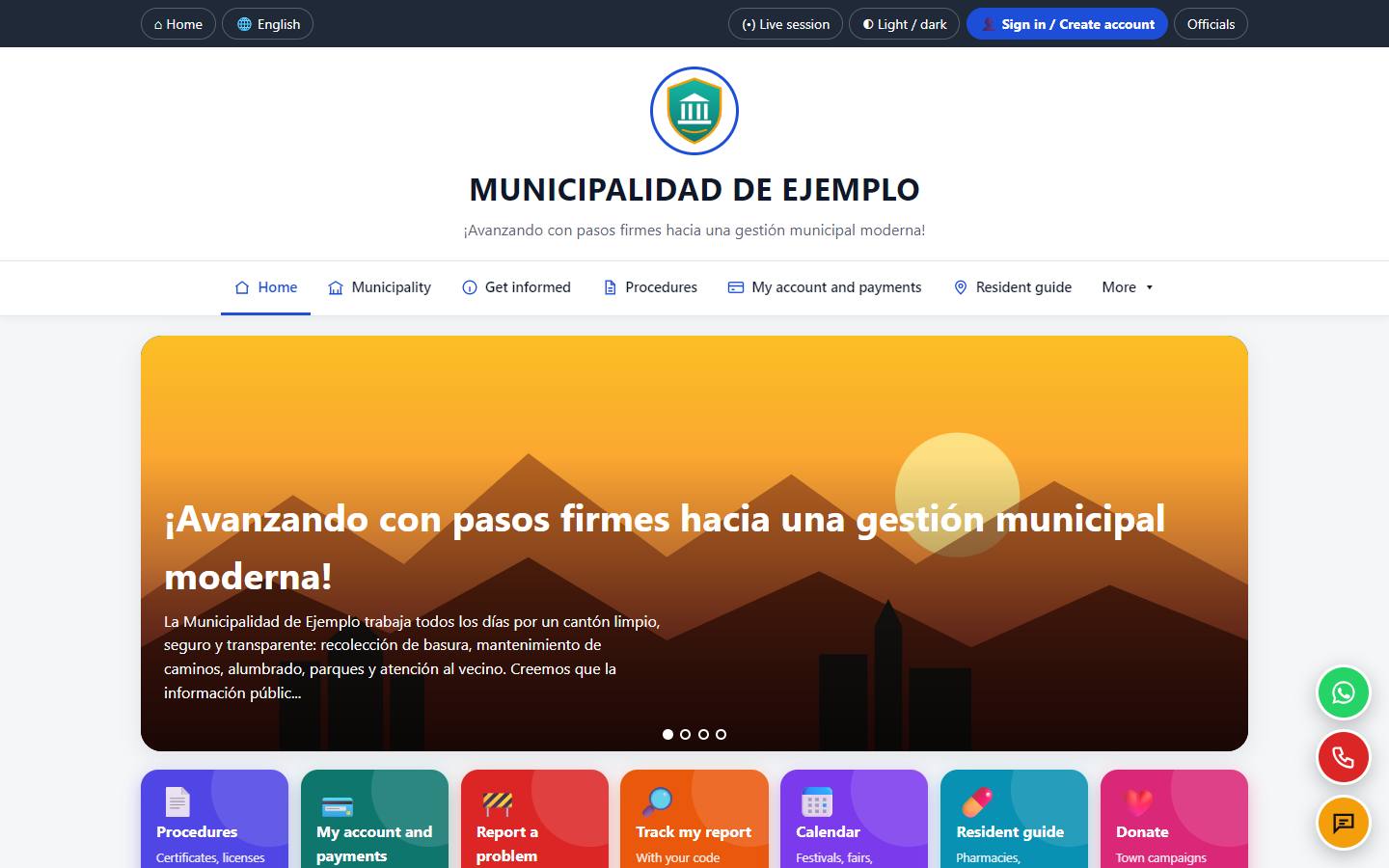
  • "We don't have a website." It is included: home page, authorities, news, events calendar, resident guide, transparency and donations, at each municipality's own address.
  • "Nobody can see how the money is spent." The transparency portal publishes the revenue collected and the municipality's documents (budgets, minutes, public works, reports), always as totals, never an individual's debt.
  • "Everything is in Excel." It can be imported: residents, properties, past debts, neighborhoods, census, electricity and water subscribers, business licenses, cemetery and places in the guide. And everything can be exported to Excel or PDF.
The town's website, included in the system

Why it is different

  • Everything is configured from the panel. Rates, percentages, late fees, currencies, exchange rates, the wording of notices, each module's rules: the municipality changes them itself, without programrs. The tax engine calculates on a fixed amount, the rental value, the assessed value or the square meters.
  • Six languages. Spanish, Arabic (right to left, including receipts and PDFs), French, English, Portuguese and Chinese. Each user chooses their own, and whatever residents receive comes out in their municipality's language.
  • Several currencies at once. It collects in the local currency, in dollars or in whichever currency the municipality uses, at the exchange rate it enters each day; a single payment can be partly in one currency and partly in another, with the change calculated.
  • The cash desk works without internet. During an outage, the cashier keeps collecting with a provisional receipt; when the connection returns, each payment gets its official receipt, never twice.
  • The town's website, included. With its coat of arms, its photos, its color and its own address; it installs on the phone like an app, with the town's name and color.
  • Real transparency. A public portal with the municipality's figures, open data, news and public works, without ever exposing a resident.
  • Security built for government. Roles per municipality, nobody hands out more power than they have, mandatory two-factor authentication for anyone who manages users or settings, a 6-digit security code for sensitive changes, an activity log of who did what and from where, encrypted backups every day, and links sent to residents that expire and can be revoked.
  • Sold in modules. The core (registry, taxes, cash desk and transparency) comes with every plan; the rest (procedures, electricity, water, business licenses, cemetery, markets, accounting, payroll, council, voice agent…) is added when the municipality needs it.
  • It respects residents' privacy. Residents can request all their data or ask for it to be erased (receipts remain, without saying whose they are); the photos they upload are stripped of the phone's location.
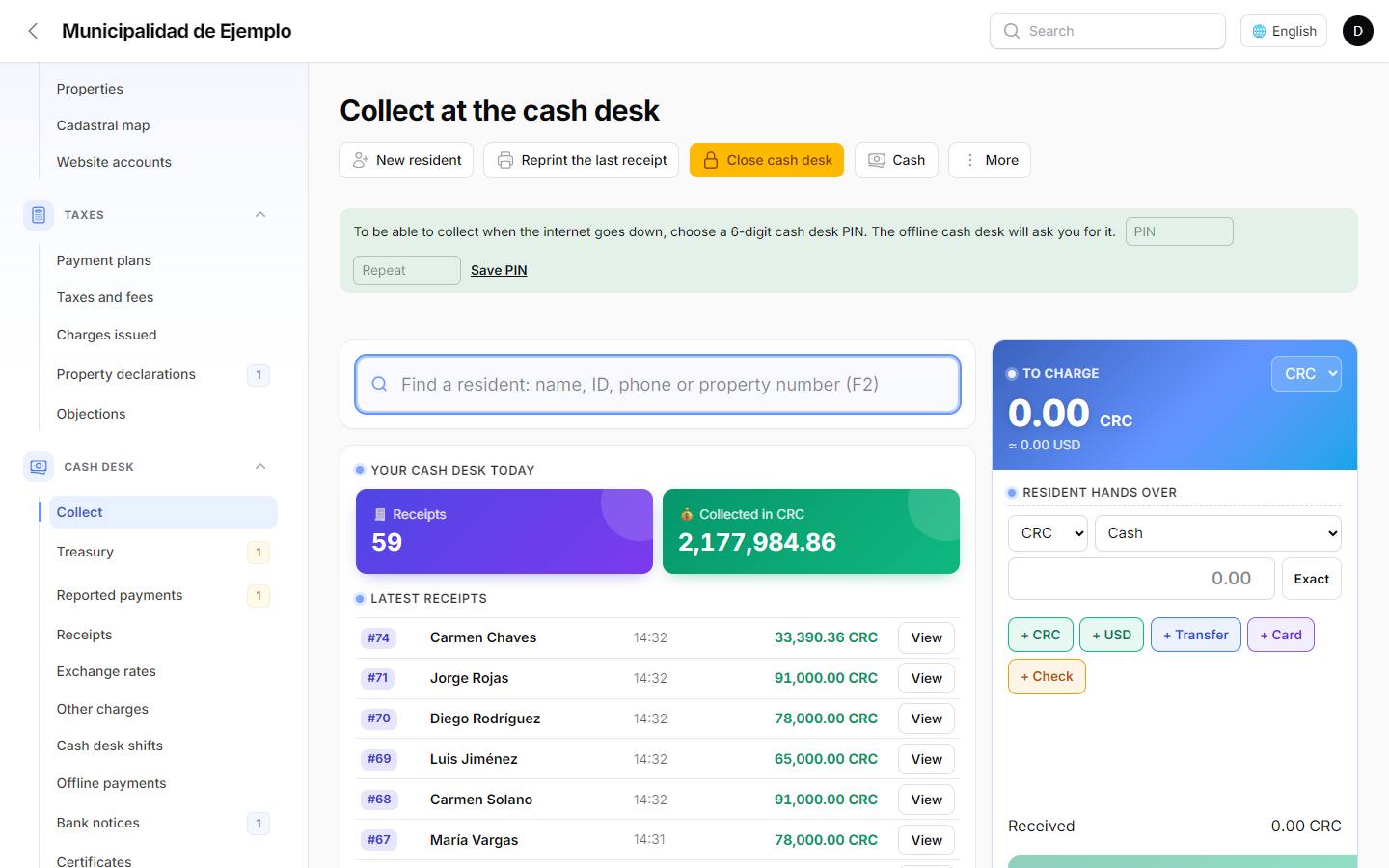
The multi-currency cash desk, with the resident's profile alongside

How to get started

  • Try it today, without creating an account. On the home page, "Try the system": choose one of the two sample municipalities, with different currencies, languages and laws, and a role (mayor, cashier, secretary or meter reader) and log in with one click. You can use every feature; the demo is reset every night, and it never sends a real message.
  • Request a demo with your data. With the "Request a demo" form we will show you the system with your municipality's rates and data.
  • Getting up and running. Your municipality starts with its roles, its catalog of procedures and the base configuration in its language; its taxes, currencies and users are loaded, and staff learn with the user manual, which is built into the system in all six languages.
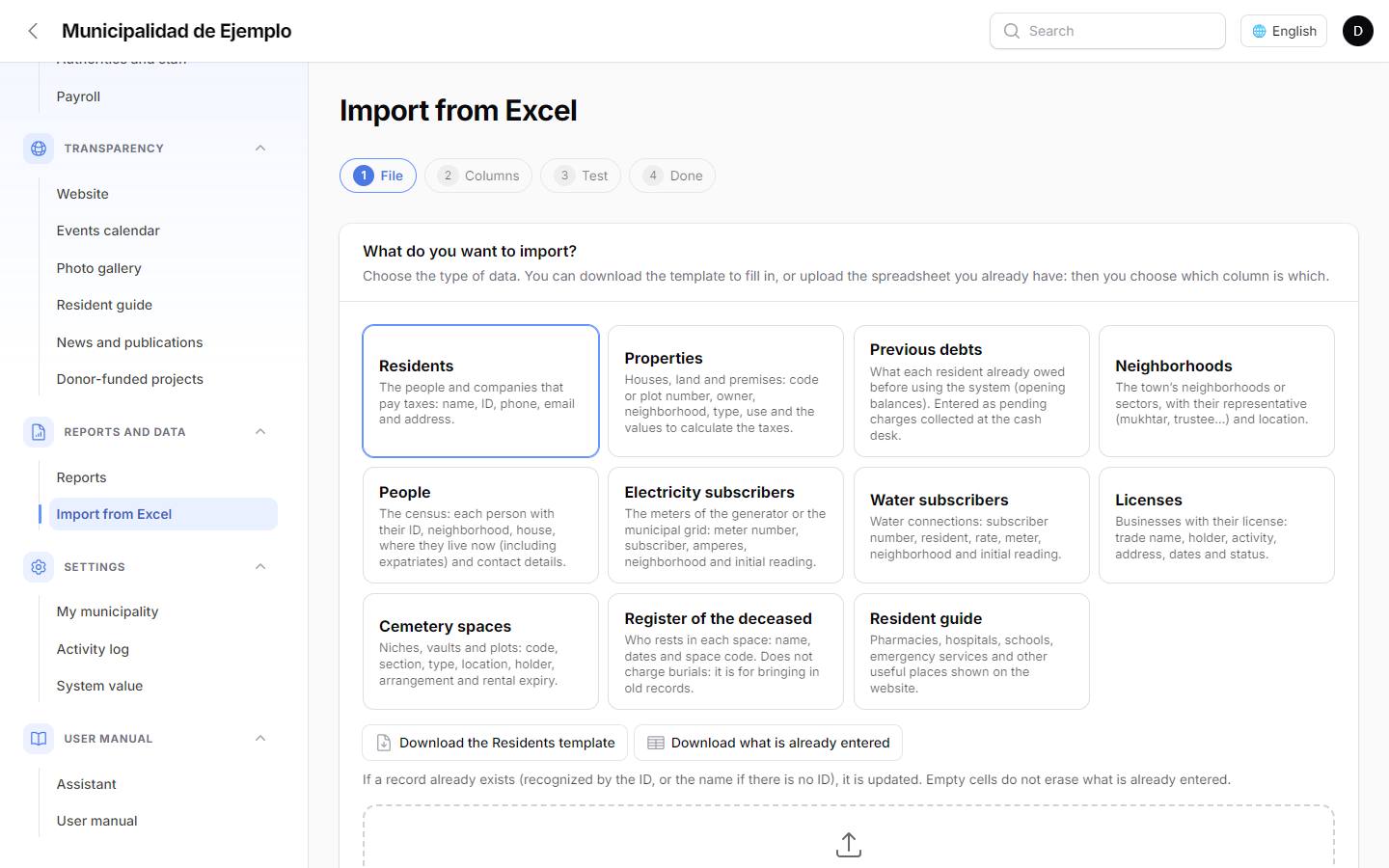
  • What you have in Excel today, brought inside. The system guesses the columns (including headings in Arabic), lets you test without saving, shows errors row by row and never deletes data because of an empty cell.
  • Trial days. Plans can include free trial days before the first charge.
Import from Excel: columns guessed, a test run without saving and errors row by row

Everything it includes

Each municipality chooses the modules it needs. Tap one to see what it does, with its screens.

🛡️ Platform, security and languagesA cloud system for many municipalities at once, where each one sees only its own data, with tailor-made roles, two-factor authentication, an activity log of everything that happens and encrypted backups. It works in six languages, in several currencies and in any country. 👥 Registry of residents and propertiesWho each resident is, what properties they own and how much they owe today, in a single profile. With their account statement in PDF, payment reminders by WhatsApp and email, and an account on the website so residents can see their own details without going to the municipality. 🏘️ Census of neighborhoods, houses and peopleWho lives in each neighborhood and each house, who has moved to another city or abroad and how to reach them. With voting data protected by a separate permission and messages to expatriates in two clicks. 🧾 Taxes, charges and payment plansEach municipality defines its own rates and taxes, issues them to the whole town with one click and applies late fees exactly as its regulations say. Anyone who cannot pay everything at once signs an installment plan. 🏠 Property taxEach property's assessed value comes from the owner's declaration or from a valuation, with its period of validity, and a sole home does not pay tax on the amount the law exempts. The system flags which properties have an expired declaration. 💵 Multi-currency cash deskA counter built for collecting quickly in any currency, with change, shifts with cash counts, treasury all the way to the bank deposit and receipts with QR codes. It keeps collecting even when the internet goes down. 📊 Budget and accountingThe accounts (IPSAS, accrual basis) build themselves from what is billed and collected; the accountant only records what does not go through the cash desk. The budget is executed with what is collected and spent, with reports for the Comptroller's Office. 📄 Online procedures and certificatesResidents request certificates, licenses and permits from home, follow them with a code and receive a PDF certificate with a QR code that anyone can verify. The municipality handles each request step by step, with no lost paperwork. 🏪 Business licensesEvery business in the municipality with its activity, its license with a verifiable QR code, online income declaration and installment billing with automatic late fees and fines. No business goes uncharged or has an expired license without anyone knowing. 🗺️ Cadastre with mapAll the municipality's properties on a map, colored by account status, use or value declaration, with the boundaries of each plot drawn by hand on the map. Without buying a geographic information system or hiring specialists. 🧱 Building permitsThe building permit from start to finish, from the online request with the details of the works to the fee each country's law requires (on the value of the works or per m² on the value of the land), the license, inspections with photos, closure orders and completion. Every construction project in the municipality, with its status, in a single list. 🗂️ Electronic case filesThe registry office and the folioed file, without paper: each matter with its number, folios nobody can change, transfers between offices with acknowledgment of receipt, and residents can check its status from the website. You always know where each file is and since when. 🏛️ Municipal councilThe council's work from start to finish: the notice of meeting with its agenda, attendance and quorum, who spoke and how each member voted, the minutes, and a decisions register that, like the paper one, cannot be crossed out or torn out. With administrative oversight and its deadlines, publication and certified copies. 💡 Municipal electricity from generatorsFor the municipality that sells power from its own generators. Fixed charge for each amperage, kWh at each month's rate, meter readings from a cell phone, the bill with all the detail the authorities require, collection at the same cash desk, late-payment fines, disconnections and tracking of each generator and its running hours. 💧 Metered waterThe municipal water supply in order: rates by m³ blocks, flat fee or annual subscription by gauge, meter readings from a cell phone with warnings of possible leaks, monthly billing with one button, disconnections and charged reconnections, and each resident's consumption visible in their account. 🧾 Neighborhood collectorsFor the municipality that collects door to door. Each neighborhood with its collector and its route, and "My route" on the phone, with no signal, to read the generator meter and collect everything in the same visit. 🕊️ Municipal cemeteryThe cemetery organized and billed: sections drawn on a map, niches and plots with their holder, rentals and perpetual rights, burials and exhumations with their rules, annual maintenance, expiry notices and a search so families can find their loved ones. 🏪 Markets and fairsThe municipal market with its stalls rented by contract and the fair with permits by the day. The rent is generated automatically every month, prorated if the contract starts or ends mid-month, never charged twice, and paid at the same cash desk as any tax. 🪧 Use of public space and advertisingPermits to use public space (tables on the sidewalk, kiosks, awnings) and for advertising (signs, illuminated or not), with their license, their annual charge never issued twice and their expiry, at the same cash desk as any tax. 👮 Municipal policeMunicipal police reports in the system, with the municipal fine that reaches the cash desk and the referral to the judge of what the court fines. 🚚 Fleet and machineryThe municipality's trucks, pickups, machines and generators with their fuel, maintenance, trips and incidents. It warns when maintenance is due and when insurance and vehicle inspections expire, works out each one's efficiency and charges spending to the budget line. 🧾 Staff payrollMunicipal staff salaries month by month, from the same staff record: deductions, employer contributions and income tax in brackets configured by the municipality, Christmas bonus, approval, payment with its expense in the budget and payslips ready to print. 🌐 The town's websiteA modern website for the municipality, ready from day one and fed by what staff already enter in the system: authorities, news, events calendar, gallery, resident guide, procedures, payments and chat, in six languages and on the phone like an app. 📊 Transparency portalWhat the municipality collects and publishes, visible to everyone and updated automatically from the cash desk: revenue by month, billed and collected by tax, budgets, minutes and reports, and open data in CSV. Without a single piece of data about any resident. 📱 The QueMop appA real app for residents, made for the phone: report with a photo and GPS, see what they owe, the town guide without signal, and Face ID. The same app takes collectors and staff to their own work. For Android and iPhone. 🚧 Resident reportsPotholes, trash, street lighting, water leaks, stray animals or noise. Residents report it from their phone with a photo and location, without creating an account, and follow it with a code; the municipality handles it with deadlines, people in charge and a map of where problems cluster. ❤️ Donations and campaignsCampaigns with a target and a progress bar, donations in any currency and in kind, a receipt for every donor and a public account of every expense with its invoice. So that those living elsewhere can help their town with confidence. 🏗️ Donor-funded projectsPublic works paid for by UNDP, the European Union, an embassy or the diaspora, with a budget by line, disbursements, expenses with supporting documents, indicators and progress updates with photos, and the donor report ready in one click and in the donor's language. 🗳️ Consultations and participatory budgetingThe municipality asks and residents decide from the website, by secret ballot, once per person: single- or multiple-choice consultations, participatory budgeting that does not let the total be exceeded, residents' proposals and results in plain view. 💬 Notices, messages and chatThe municipality writes to each resident by email and WhatsApp without anyone copying numbers by hand, and its staff communicate inside the system, with notices that show who has already read them. 📞 Voice agentAn assistant that answers the municipality's phone when nobody else can: it tells residents how much they owe and where their case file is, takes reports and messages, answers questions and transfers the call to the right office. 🤝 Union of municipalitiesAn overview of all the towns in a union on a single screen: how much each one bills and collects, which reports and procedures it has open and how the donor projects are going, without ever showing any resident's data. ✨ AI assistantAny official can ask in their own words how to do something in the system and receive the steps from the manual with the button that takes them to the screen. And anyone getting to know the system for the first time can ask the portfolio whatever they want to know. 🆕 What's newThe latest additions to the system.
🛡️

Platform, security and languages

A cloud system for many municipalities at once, where each one sees only its own data, with tailor-made roles, two-factor authentication, an activity log of everything that happens and encrypted backups. It works in six languages, in several currencies and in any country.

Included in every plan
Platform, security and languages
Platform, security and languages Platform, security and languages Platform, security and languages Platform, security and languages Platform, security and languages Platform, security and languages

A municipality cannot afford to lose its data, to have an official see what is not theirs to see, or to depend on a technician to change a rate or a permission. This system is built for exactly that: each municipality has its own space, separate from the others, with its own users, roles and configuration, and everything is managed from the panel. It works the same for a town that collects in two currencies and writes in Arabic as for a municipality that collects in one and works in Spanish.

The dashboard showing what was collected today, this month and what is still outstanding

The essentials

  • Each municipality, its own data. Residents, receipts, roles, activity log, reports and downloads belong to a single municipality. No list, screen, report, import or downloaded document shows anything from another one, and this is checked in every version of the system.
  • Roles and permissions tailored to each municipality. It starts with ready-made roles (mayor, deputy mayor, council, secretary, treasurer, accountant, cashier, meter reader, municipal police, technician and read-only) and the municipality can rename them, change their permissions or create new ones. Changing a role in one municipality does not affect any other.
  • More than 90 permissions, task by task. View, collect, void, issue, approve, export, import… each one separately. A person can hold several roles: a council member who is also the treasurer.
  • Mandatory two-factor authentication for those in charge. Anyone who can create users, change permissions or the settings cannot use the system without activating an authenticator app on their phone (Google Authenticator, Microsoft Authenticator…). Everyone else can activate it if they wish.
  • A security code for every sensitive change. Creating or changing a user, a password, a role or the settings also requires the 6-digit code from the phone at that moment. Even if someone leaves their session open or has their password stolen, nobody can grant themselves permissions.
  • An activity log of everything. Who logged in, logged out or entered a wrong password, who created users or changed permissions, who exported or imported data, with the date, the time and the IP address it came from. Nobody can edit or delete it, not even the mayor.
  • An activity log with before and after, tamper-proof. Changes to charges, receipts, exchange rates, taxes and municipal rules are recorded automatically with what was there and what it became, and each line carries a fingerprint chained to the previous one: if anyone alters it directly in the database, Verify the activity log flags it. Every night the fingerprint of the last line is emailed to whoever the municipality chooses: even if someone recalculated the whole chain, the tampering would show against that fingerprint.
  • The mayor's dashboard. On logging in, whoever runs the municipality sees what was collected today and this month, what is still outstanding, the revenue for the last 12 months, the overdue debt, the services due for disconnection, the residents waiting for a reply and the latest activity.
  • Six languages, Arabic right to left. Spanish, Arabic, French, English, Portuguese and Chinese. Each official chooses their own; PDFs and Excel files come out in that language, and in Arabic the sheet and the document run right to left with properly joined letters.
  • Several currencies. A main currency plus any others the municipality accepts, each with its exchange rate by date. Totals never mix currencies: there is one total per currency.
  • For any country. Country, currency, language and time zone are chosen per municipality. Nothing specific to a country is written into the program: taxes, rates and late fees are set up from the panel.
  • Your country's law in one click. A legal template loads in one go the fees with their minimums, the building fee and deadlines, the council oversight rules, the years for the limitation period, the building certificates and the public space occupation classes. It only loads what is missing and everything stays editable.
  • Import from Excel. Residents, properties, past debts, neighborhoods, census records, electricity and water subscribers, business licenses, cemetery and the resident guide are loaded from the spreadsheet the municipality already has, with a test run beforehand that saves nothing.
  • Export any list to Excel or PDF. Every list has its Export button: it exports exactly what is on screen, with the filters applied.
  • More than 30 ready-made reports. Cash desk closing, debts by resident, debt aging, billed versus collected, registry, census, electricity, water, business licenses, cemetery, donations, projects, payroll, accounting, procedures and user activity, on screen, in Excel and in PDF.
  • The system's value, in plain view. In Settings → System value and on the public home page: what the system is worth today in dollars, with the hours of work, the lines of code, the files, the modules and the languages, and what each stage added. The value grows with each new stage, and development began on January 1, 2026.
  • Encrypted backups off the server. Every day, at the time chosen, an encrypted copy of all the information and files is sent to one or more external providers. If a backup fails, an alert is sent.
  • Backups that cannot be deleted, and tested restores. With a bucket that has object lock, not even someone who gets into the server can delete the copies; and a drill restores a full copy into a separate database and compares it table by table.
  • It works on cell phones. Each municipality's panel and website adapt to the phone screen, and can be installed as an app from the browser.
  • Light and dark mode. Each person chooses their own; by default it follows the phone's or computer's setting.

The details that make the difference

  • Nobody gives themselves more power than they have. Whoever creates users or roles can only hand out the permissions they themselves hold, and cannot edit a user who has more permissions than they do.
  • New permissions reach the mayor. When the system adds a feature, the mayor and the administrator receive its permission automatically, without restoring anything the municipality has removed from them by hand.
  • Strong passwords. At least 10 characters, with letters and numbers. Five wrong security codes lock the attempt for a few minutes, and every mistake is recorded in the activity log.
  • Recovery codes. If an official loses their phone, they log in with one of their recovery codes.
  • Each municipality with its own look. Its name, coat of arms and color in the panel, its photo of the town on the login screen and its icon on the browser tab.
  • Its own address. Each municipality has its own subdomain (for example, yourtown.quemop.com) where its website opens, and its staff log in to the panel there.
  • The computer remembers the municipality. After the first login, the login screen shows that municipality's coat of arms and name.
  • Modules by plan. The core (registry, taxes, cash desk and transparency) are always included; the rest is switched on as an add-on. Whatever a municipality has not subscribed to does not appear.
  • Large amounts that are easy to read. On the dashboard, "118.5 M" with the exact figure underneath: with a currency of very large figures, whole numbers do not fit on the card.
  • Each currency with its own decimals. A currency without cents and the dollar with two, on receipts, notices, certificates and the website; the municipality changes it in the cash desk settings.
  • Official documents in the municipality's language. Receipts, minutes, attestations, licenses and certificates come out in its language and, in Arabic, right to left, even if whoever prints uses the panel in another one.
  • Excel files you can add up. Numbers and dates come out as numbers and dates, document numbers keep their leading zeros, and the header row is frozen and filterable.
  • PDFs ready for signing. With the municipality's logo and details, headings repeated on every page and numbered pages.
  • An empty cell never deletes anything. When importing, what was already loaded is not lost because a column comes in empty, and rows with errors do not hold up the rest.
  • Backups nobody else can open. Backups are encrypted with a key chosen by the platform owner; a truncated or tampered copy will not open.
  • Browser protection. The system cannot be embedded in other websites, nor can it load programs from other sites.
  • Residents' data under control. Residents can request all their data or ask for it to be erased (without losing the receipts the law requires to be kept), and the details of anyone who filed a report are erased automatically after the number of days the municipality sets.
  • Voting data, restricted. Where each person votes makes it possible to infer their religious affiliation: not even the mayor sees it unless it is granted. And anonymizing a resident also erases their data in procedures, notices and their census record; the municipality chooses what else (certificates, licenses, the activity log, which is left struck out without breaking) and which official registers it keeps.
  • User manual built in. One guide per module, with search and screenshots, in each official's language, which can be printed or saved as PDF.

For the subscribing municipality

  • My municipality. Name, phone, email, address, population, time zone, the town's location on the map, logo, color, main language and currencies, without having to ask anyone.
  • My subscription. Its plan, its invoices, its payments and how to pay, visible to whoever administers it.
  • Trial period. A plan can include free trial days, and so can an add-on.
  • Quick setup. A new municipality can start by copying the configuration of another one in the same country: rates, other charges, rates and exchange rates, without any residents' data.
  • A demo to try out. From the home page you can enter a demonstration municipality with one click, as mayor, cashier, secretary or meter reader. You can use every feature: it is reset every night, and no real message is ever sent.

↑ Back to the index

👥

Registry of residents and properties

Who each resident is, what properties they own and how much they owe today, in a single profile. With their account statement in PDF, payment reminders by WhatsApp and email, and an account on the website so residents can see their own details without going to the municipality.

Included in every plan
Registry of residents and properties
Registry of residents and properties Registry of residents and properties Registry of residents and properties Registry of residents and properties

In many municipalities the registry is scattered across notebooks, spreadsheets and the cashier's memory: nobody knows for sure how many residents there are, which property belongs to whom or how much each one owes. This module brings everything together in one place. Each resident, whether a person or a company, has a profile with their properties and their debt calculated to today, and that is where taxes, payments and notices come from. It is included in every plan.

The list of residents with their properties and their pending charges

The essentials

  • Residents. People and companies that pay taxes, with name, identity document, phone, email, address and notes. The list shows how many properties each one has and how many charges they owe.
  • Properties. Houses, apartments, buildings, shops and land plots, with their cadastral code or property number, owner, address, neighborhood, zone, floors, apartments or units inside, year of construction and photo.
  • The values that drive the taxes. Annual rental value (where the rate is charged on the rent), assessed value (where the tax is charged on the property's value) and area in square meters. Only what the municipality uses needs to be filled in.
  • The use of each property. Residential, commercial, industrial, agricultural, land, mixed or institutional: a rate can apply only to a certain use.
  • Instant account statement. From the resident's profile: what they owe today with the late fee calculated, each charge with its due date and their latest payments.
  • Payment notice in PDF. The formal account statement, grouped by tax and with the total per currency, ready to print or send by WhatsApp or email.
  • Payment reminders to many at once. Choose the neighborhood, a tax they owe, a minimum amount and the days overdue, and the channel (email, WhatsApp or both). Before sending, the system tells you how many residents it will reach.
  • Collect from the profile. One tap opens the cash desk with that resident already selected, and another sets up an installment payment plan.
  • Certificate of good standing. From the cash desk, the PDF stating that the resident owes nothing overdue, with a QR code to verify it.
  • Website accounts. Residents open their account on the municipality's website, and staff see who registered, with what details and whether they have already linked it to their profile.
  • Cadastral map. With the cadastre add-on, each property appears on the map colored by account status, use or value declaration.
  • Import the registry from Excel. Residents and properties are loaded in one go from the existing spreadsheet; if a property's owner is not there, they are added, and if the neighborhood does not exist, it is created.

The details that make the difference

  • One document, one resident. The identity document cannot be repeated within the municipality, even if another municipality has the same person.
  • The document is found however it is written. With spaces, hyphens or without them: the resident can still log in to their account.
  • A property without an owner generates no charges. When issuing charges, the system reports how many were left in that state so they can be completed.
  • One cadastral code, one property. The code cannot be repeated within the municipality.
  • Primary residence exemption. With the property tax add-on, a person's sole home is exempt up to the amount set by the municipality, and the system prevents a second one from being marked.
  • Secure links for residents. The account statement and receipts are sent with a link that cannot be guessed and expires on its own (7 days for the account statement and 90 for receipts, or whatever the municipality sets). Cash desk staff can revoke them all with one click if the resident has lost their phone.
  • Every opening is counted. The municipality knows whether the resident opened the link and when.
  • The account statement is not left in caches. The PDF with the resident's debt tells browsers and servers along the way not to store it.
  • The certificate is not issued with overdue debt. What falls due later (next quarter's installment) does not prevent it: being up to date means having nothing overdue. It is valid for the number of days the municipality sets (30 by default).
  • Right of access. One button delivers a file with everything the system holds about a resident, without passwords or secrets.
  • Right to erasure. Anonymizing erases the name, document, phone, email, address and website account; receipts and charges remain, as the law requires, without saying whose they are. It cannot be done if the resident still owes money or has an active payment plan, and it is recorded in the activity log with the reason.
  • Block or unlink an account. If something does not add up, staff can block the website account or detach it from the profile: the account no longer shows the debt until it is linked again.
  • Change a resident's code. If someone else knows their lookup code, a new one is generated and the old one stops working.
  • Search bar at the top. The panel's search finds a resident by name from any screen.
  • Export with filters. Residents and properties are exported to Excel or PDF with the filters applied (use, type, neighborhood, active), or only the selected rows.

For residents

  • My account. On the municipality's website, residents see what they owe with the late fee up to today and in each currency, their receipts, their payments and their payment plans.
  • Two ways to log in. With their document and the code printed on their receipts (or a 6-digit code sent to their WhatsApp or email), or with their own email address and password.
  • Proving their identity just once. The account is linked to their profile with the code on their receipts or one sent to the phone or email in the registry. Without that proof, nobody can open an account with someone else's document and see what they owe.
  • Report a payment. They pay through the bank or a digital wallet, upload the proof, and the cash desk reviews it and issues their receipt.
  • If they forget their password, they change it with a code sent to their account's email and WhatsApp.
  • A wrong code reveals nothing. The system does not say whether the document exists, and the 6-digit code expires and is locked after five attempts.
  • Verify a certificate. The QR code on the certificate of good standing opens, on the municipality's website, the confirmation that it is authentic.

↑ Back to the index

🏘️

Census of neighborhoods, houses and people

Who lives in each neighborhood and each house, who has moved to another city or abroad and how to reach them. With voting data protected by a separate permission and messages to expatriates in two clicks.

Add-on module
Census of neighborhoods, houses and people

The registry says who pays; the census says who lives in the town. Many municipalities do not know how many people they have in each neighborhood, or how many of the town's sons and daughters live in the capital or abroad, who are often the ones who help most when there is a campaign. This module builds that human map: neighborhoods with their representative, houses and land plots with their owner, and each person with their contact details, where they live today and, only for those with the permission, where they vote.

The people in the census with their neighborhood, their age and where they live

The essentials

  • Neighborhoods. Each neighborhood or sector with its representative (community leader, neighborhood head…), their phone number, a description and the location. The list counts houses, land plots, people and how many live elsewhere. They are the same neighborhoods used for electricity and water subscribers and, with the collectors module, for the collection routes.
  • Neighborhood profile. Everything together on one screen: the houses and land plots with their owner and floors, how many people live in each, the list of people and the neighborhood summary.
  • Houses and land plots. These are the registry's properties, with neighborhood, type (house, apartment, building, shop, land plot), floors, apartments or units inside, year of construction and photo. They are entered only once and serve both the census and taxes.
  • People. First name, surnames, father's name, document type and number, date of birth, sex, occupation, place in the household (head of household, spouse, child, father or mother, other relative), phone, WhatsApp, email, neighborhood, house where they live and address.
  • Where they live now. In the town, in another city in the country or abroad, with the city and the country.
  • Expatriates. A menu shortcut shows those living abroad, filterable by country, city and whether they have a phone or email.
  • Messages to a group. Filter (for example, those living abroad), select them and send them a message by WhatsApp, by email or both: an invitation to a campaign, a notice, a call to a meeting.
  • Link with the registry. If the person also pays taxes, they are linked to their resident profile. A child or a grandparent is in the census even if they pay nothing.
  • Voting data. Voter registration number, polling station and polling table, only for those with the See where each person votes permission.
  • Census reports. Census by neighborhood (people, where they live, women and men, minors and adults, houses and land plots, figures only) and Expatriates by country (by country and city, and how many have a phone or email).
  • Import from Excel. Neighborhoods and people are loaded from the existing spreadsheet, including expatriates.

The details that make the difference

  • Three separate permissions. Viewing the census, entering it and knowing where each person votes are assigned separately. Without the last one, voting data is not even read: there is no other way to see it.
  • The census never appears on the public website. At most, the website shows how many neighborhoods the town has.
  • Every export leaves a trail. Exporting people requires the permission to enter census data, and every export is recorded in the activity log with the name of whoever did it. The file includes voting data only if the person exporting has that permission.
  • Every message is recorded. The activity log keeps how many people received it and who sent it; also who opened a neighborhood's profile.
  • One document, one person. The document number cannot be repeated within the municipality.
  • Age always up to date. It is calculated from the date of birth; it never has to be updated.
  • In the town by default. Anyone who does not say otherwise lives in the town; marking another city or abroad automatically moves them to the corresponding list.
  • The police do not see the census. Roles that do not need it do not see it, and each municipality sees only its own.
  • No messages from the demo. A demonstration municipality never sends a real message.

↑ Back to the index

🧾

Taxes, charges and payment plans

Each municipality defines its own rates and taxes, issues them to the whole town with one click and applies late fees exactly as its regulations say. Anyone who cannot pay everything at once signs an installment plan.

Included in every plan
Taxes, charges and payment plans
Taxes, charges and payment plans Taxes, charges and payment plans Taxes, charges and payment plans

In many municipalities rates are worked out by hand, in a notebook or in an Excel sheet that only one person understands, and the late fee is charged by guesswork. This module puts the rules into the system: you define each tax once (how it is calculated, how often it is charged and what late fee applies) and the system issues the charges for every resident, never duplicating any and with the late fee calculated the same way for everyone. Nothing is hard-coded in the program: it works for a rate on rental value, a tax on the property's value or a waste collection fee that is the same for the whole town.

The essentials

  • A tax engine built from the panel. Each tax chooses its basis: a fixed amount, a percentage of the rental value, a percentage of the assessed value or an amount per square meter. An additional fixed amount can be added.
  • Per property or per resident. A tax is charged for each property (street lighting, sidewalks, property tax) or for each resident (a license, a personal fee).
  • Only to those it applies to. A tax can apply only to certain property uses: residential, commercial, industrial, agricultural, land, mixed or institutional.
  • Annual minimum and maximum. The system never charges less or more than the municipality sets.
  • Annual, half-yearly, quarterly or monthly. The amount for each period is the annual amount divided by the number of periods in the year.
  • One-click issuing. Issue charges creates the period's charge for every property or resident it applies to, with its due date (the issue date plus the days allowed for payment).
  • Issuing twice does not charge twice. If someone presses the button again, whatever already exists is skipped. When it finishes, the system says how many charges it issued, how many already existed and how many properties have no owner recorded.
  • Late fee per month overdue. A percentage for each month, or part of a month, after the due date: one day late already counts as a month, as many municipalities charge it.
  • Payment plans (agreements). A resident who owes a lot pays a down payment and the rest in monthly installments. The agreement is printed for signing, and the system tracks overdue installments automatically.
  • Issued charges at a glance. A list of all charges, filterable by status, tax and period, which can be exported to Excel or PDF.
  • Statutory exemptions per property. A place of worship, a diplomatic mission, the UN or a State building is marked exempt once, with the reason, until when and from which taxes: no charge is created for them when issuing, and the system says how many were left exempt.
  • Revaluation by law in one step. When a law raises rental values (for example, ×10 for housing and ×10, ×20 or ×15 for everything else depending on the floor), the system multiplies them for the whole registry, shows beforehand how much each group changes, respects those already revalued and keeps the history of each value.
  • Statute of limitations as the law sets it. The municipality sets the years its law provides (for example, four: until December 31 of the fourth year). The system counts from the issue date or from the last payment, plan or formal payment demand, and shows the debts that are already time-barred so they can be declared so, with the legal grounds.

The details that make the difference

  • No interest on interest. The late fee is always calculated on what remains of the original amount, never on previous late fees.
  • A month's late fee is charged only once. If the resident pays in parts within the same month, they do not pay that month's late fee again.
  • The period is validated. A half-yearly tax only accepts 2026-S1 or 2026-S2; a monthly one, 2026-01 to 2026-12. A wrongly written period is rejected before anything is issued.
  • The notice goes out on its own. When charges are issued, each resident receives their bill by email and WhatsApp, if the municipality has those channels connected.
  • Past debts, from Excel. What residents already owed before using the system (the treasury's notebook or Excel sheet) is brought in with Import from Excel as pending charges, and collected at the cash desk like any other.
  • Each currency in its place. Each tax is charged in the currency the municipality chooses, among those it uses; the resident can later pay it in another currency at the cash desk.
  • Voiding with a reason. A charge issued by mistake is voided by giving the reason, which is recorded in the activity log. If it already has payments, the receipt is voided first: that way the cash desk always balances.
  • Payment plans on the municipality's own terms. Each municipality sets the maximum number of installments, the minimum down payment (as a percentage of the debt), the monthly interest (zero if it charges no interest) and how many overdue installments mean the plan is broken.
  • The plan in view before signing. While the official sets up the plan, they see each installment with its date and amount. With interest, installments are fixed; without interest, they are equal and the last one adjusts the cents.
  • The debt is frozen on signing. Whatever goes into the plan stops accruing late fees and is marked "In a payment plan".
  • One plan, one currency. The system proposes the debts in the currency in which the resident owes most and does not allow currencies to be mixed.
  • Paid off or defaulted, automatically. When the last installment is paid the plan becomes Paid off and the original debt is marked as paid. Every morning the system checks for arrears: if they exceed the limit, it becomes Defaulted and whatever is left comes back as a single pending charge.
  • Voiding without losing anything. If no installment has been paid, the original debt comes back exactly as it was; if something has already been paid, only what is left comes back.
  • Separate permissions. Whoever sets up plans (the cashier) cannot void them or change their rules (the treasurer). Issuing and voiding charges are also separate permissions.
  • Objections with legal deadlines. A resident's objection against a charge is recorded with its number and its file, and the system counts the deadline to object, the municipality's deadline to decide and the objections committee's. What is granted is discounted from the charge, with the objection number; what is rejected goes to the committee, as municipal tax laws require.
  • The committee valuation, with minutes. The rental value set by the valuation committee stays in the property's history with its minutes, and the owner can request a revaluation if the property has lost value.
  • Ready-made reports. Debts by resident, debt aging, billed and collected by tax, charges by due date and payment plans, on screen, in Excel or PDF.

For residents

  • They see what they owe on the website. In My account and payments, with the late fee calculated up to today and the total in each currency.
  • They see their payment plan. Each installment with its due date, what has been paid and what is left.
  • They receive the payment reminder. By email with the account statement in PDF and by WhatsApp with the total and the link.

↑ Back to the index

🏠

Property tax

Each property's assessed value comes from the owner's declaration or from a valuation, with its period of validity, and a sole home does not pay tax on the amount the law exempts. The system flags which properties have an expired declaration.

Add-on module
Property tax
Property tax Property tax

Where property tax is a percentage of the property's value, the problem is not the calculation but the value: paper declarations that nobody checks, valuations that get lost and properties that have gone years without being declared. This module keeps the complete record of value declarations, for any municipality that charges this way: the owner declares, at the municipality or from the website, the official accepts or rejects it, and the accepted value flows automatically into the tax calculation. It is used together with the Taxes engine, with a tax based on the assessed value.

The essentials

  • Declarations and valuations in one place. Each record states which property it belongs to, its type (owner's declaration, municipal valuation, mortgage value or sale value), the land and building areas, the value of each and the supporting document.
  • Review with one click. The official opens the document and accepts it (it becomes the property's assessed value) or rejects it with the reason.
  • Configurable validity. Each municipality says how many years a declaration is valid for (for example, five). When it is accepted, the system records the date until which it is valid.
  • Sole home exemption. A person's sole home does not pay tax on the amount the municipality sets under its law. The tax is calculated on the assessed value minus that amount.
  • Expired declarations. A report lists properties with no declaration or whose latest one has expired, with the owner and their phone, so they can be asked to declare or a valuation can be carried out.

The details that make the difference

  • Issued charges stay as they are. A new value is used in charges issued from that moment on; those already issued do not change.
  • One declaration under review at a time. A property cannot have two pending declarations at once: paperwork does not pile up.
  • Only one home per person. The system does not allow the exemption to be marked on a second property of the same owner, nor on a property owned by a company.
  • The exempt amount is updated without a programr. Since the base salary changes every year, the exemption amount is changed in the panel, under Property tax rules.
  • The area updates itself. If the declaration includes the land area, it becomes the property's area once accepted.
  • A number for every declaration. They are numbered in order for each municipality, and you can tell whether they came in through the panel or from My account.
  • Notice in the menu. The menu shows how many declarations are awaiting review.
  • Protected documents. The valuation or title deed attached can only be seen by that municipality's staff with permission.
  • Everything is recorded in the activity log. Who recorded, accepted or rejected each declaration, and when.
  • Separate permissions. Viewing declarations is one permission; accepting them, rejecting them and changing the rules is another (the treasurer and the secretary have it by default).

For residents

  • They declare from home. In My account they see their properties with the assessed value, the date it was declared and whether it has the exemption. If the declaration has expired or does not exist, they submit it right there with the document.
  • Only their own. Residents can only declare their own properties.
  • They know where it stands. While the declaration is awaiting review, the page tells them so, with the date.

↑ Back to the index

💵

Multi-currency cash desk

A counter built for collecting quickly in any currency, with change, shifts with cash counts, treasury all the way to the bank deposit and receipts with QR codes. It keeps collecting even when the internet goes down.

Included in every plan
Multi-currency cash desk
Multi-currency cash desk Multi-currency cash desk Multi-currency cash desk Multi-currency cash desk Multi-currency cash desk Multi-currency cash desk Multi-currency cash desk Multi-currency cash desk Multi-currency cash desk

Every problem comes together at a municipality's cash desk: residents who pay part in dollars and part in local currency, handwritten receipts, cash drawers that do not balance at the end of the day, cash that nobody can say when it reached the bank, and internet or power cuts that bring everything to a halt. This module covers the cashier's and the treasurer's whole day: find the resident, collect with whatever they bring, give the correct change, hand over a numbered receipt with a QR code, close the cash desk by counting the cash and take that cash all the way to the bank deposit. And if the internet goes down, the cash desk keeps collecting.

The essentials

  • A fast counter. Find the resident by name, document, phone, property number, lookup code or receipt number (with a barcode reader, just scan). What they owe today appears, with the late fee calculated to the date, and payment is taken from the keyboard (F2 to search, F9 to collect).
  • Any currency, mixed. The resident pays part in one currency and part in another, in cash, by transfer, card or check. The receipt is issued in the chosen currency and records each payment separately.
  • Correct change. If they hand over too much in cash, the system calculates the change in the currency the cashier chooses. Or, if the resident prefers, the excess is kept as a credit balance for next time.
  • The municipality's exchange rates. The municipality enters how much each currency is worth and from what date. If the exchange rate is missing, the cash desk will not collect in that currency: it never makes one up.
  • Other charges. Certificates, forms, certified photocopies or hall rental are collected even when no charge has been issued, at a fixed price or with the amount the cashier enters.
  • The resident's profile before collecting. What they owe in each currency and how much is overdue, since when they have owed it, their receipts, their payment plans, their procedures and their services (electricity, water, business licenses, cemetery, market), with alerts such as "payment plan in arrears", "service disconnected" or "phone number missing".
  • Shifts with float and cash count. The cashier opens the cash desk with the float in each currency and closes it by counting the cash. The system says whether it balances, is over or is short, currency by currency.
  • Treasury all the way to the bank. The treasurer receives each closing and each withdrawal, records the deposit with the slip and its photo, and produces the day's closing for all cash desks, ready to print with signatures.
  • Cash desk without internet. If the connection goes down, the cash desk keeps collecting and hands out a provisional receipt. When the internet comes back, each payment is applied automatically and the official receipt is issued.
  • Payments reported by residents. A resident who pays by transfer, mobile wallet or money transfer service reports it from the website with a photo of the proof; the cash desk confirms it and the receipt is issued.
  • Bank alerts by SMS. The municipality's cell phone forwards the bank's SMS messages; the system reads the amount and who paid and, if the description includes the resident's code, leaves it ready to confirm.
  • Receipts with a verification QR code. Every receipt has a QR code: whoever scans it sees on the website whether it is authentic, the amount, the date and whether it was voided.
  • Voiding undoes everything, under control. A voided receipt restores the debt, voids the other charges it included, leaves the credit balance as it was and reopens the payment plan it had completed. Whoever collected does not void their own receipts, and a receipt from a closed shift can only be voided by the cash desk supervisor.
  • Residents' data encrypted at the cash desk. What the computer stores to collect without internet is encrypted with a 6-digit cash desk PIN and erased when the user logs out.

The details that make the difference

  • Oldest first. If the resident hands over less than they owe, payment is applied starting with the oldest debt and the rest remains outstanding.
  • The "Exact" button. Fills in what is missing in that payment's currency, no calculator needed.
  • A cent is not change. When paying in another currency, the difference from rounding to the cent is not counted as change.
  • A transfer is not refunded in banknotes. If a transfer or a card payment is for more than is owed, the cash desk asks for the amount to be lowered (or leave the excess as credit): change is only given from cash.
  • The exchange rate of the date. Each payment uses the exchange rate in force on the day it was paid.
  • Protected exchange rates. One that has already been used to collect is not changed or deleted, nor can another be entered with a date earlier than those payments: a receipt handed over never changes in value. Every change is recorded in the activity log with the value before and after.
  • Two cashiers, one resident. If two cashiers collect from the same resident at the same time, the second one waits and checks the debt again: the same thing is never collected twice.
  • Mandatory reference. Transfers, cards and checks require the reference number, so they can be traced later (this can be turned off).
  • Discounts with a reason and permission. A percentage, an amount, waiving the late fee or exempting the whole charge, always with a reason; it is recorded in the charge's history, in the activity log and in the day's accounts. A late fee is never waived twice.
  • Pay in advance. The resident can prepay the coming periods (up to 12) at the same amount they will have when issued; the regular issuing afterwards does not duplicate them.
  • Voiding without losing the number. The number of a voided receipt is never reused, as any audit requires, and it shows who voided it and why, also in the activity log.
  • Credit already spent stays traceable. If the credit a resident left on one receipt has already been spent on another, that other one must be voided first: the balance is never duplicated or negative.
  • A counted shift does not change. Voiding a receipt from a shift that has already been closed does not alter its cash count: that money was already counted and handed over, and the refund comes from the treasury.
  • A single person at the cash desk. If the municipality has only one cashier, they can be allowed to void their own receipts from Cash desk settings.
  • Withdrawals and change during the shift. The cashier takes out cash so as not to accumulate too much in the drawer (with a reason and who it was handed to) or adds change. You cannot withdraw more than there is.
  • Partial cash count. The cash is counted mid-shift without closing, and it is recorded in the shift.
  • Every payment goes into the shift. Whatever a cashier collects while their cash desk is open goes into their shift, even if collected from business licenses or the cemetery.
  • Each cashier sees their own. The cashier sees their shifts; the treasurer and the accountant see everyone's and can close one that was left open.
  • If less arrives, it is explained. When receiving a closing, the treasurer counts what is handed over; if it does not match what the cash desk counted, they have to write down why.
  • You cannot deposit what is not there. The deposit cannot exceed what is in the treasury, and if the municipality keeps its accounts in the system, the money is moved from cash to bank automatically.
  • Alerts for the treasurer. A cash desk left open since another day, old closings not received, or cash not deposited for longer than the municipality allows.
  • Three receipt formats. Full page (A4 or letter), half page (A5) or 80 mm ticket for the thermal printer, and it can print straight away when payment is taken.
  • Copies that say COPY. A reprint says so on the paper and is recorded in the activity log.
  • Certificate of good standing. A PDF with a QR code for the resident who has nothing overdue, valid for the number of days the municipality sets. Anything not yet due does not prevent it.
  • Certificates stored and revocable. The certificate of good standing and the property certificate (its registry details and whether anything is owed) are kept with their number, are reprinted identical and can be revoked: scanning the QR code shows it is no longer valid. The QR code does not depend on any key that can be rotated.
  • Receipt by WhatsApp or email. Right after payment or months later, with a link to view it without an account. The link cannot be guessed, expires on its own and can be revoked if the resident has lost their phone.
  • No internet, no double charging. If sending is interrupted and repeated, each payment is applied only once. If someone paid the same thing at another cash desk in the meantime, or the amount does not match, the payment is held for review with the details.
  • The counter's date and time, with no tricks. Whatever was collected offline is applied with the date and time it was collected: a clock set ahead does not charge late fees from the future, and a payment cannot carry a date earlier than the data it was made with, so nobody can reduce a resident's late fee with an old date.
  • A late payment does not alter a cash count. If an offline payment arrives when its shift has already been closed, it goes into the open shift and is held for review.
  • The cash desk PIN. After five wrong PINs, the data is erased from that computer; anything collected that has not been sent yet is never erased.
  • What is collected offline belongs to that municipality. The data stored on the computer belongs only to its municipality, and only someone with permission to collect can download it.
  • An SMS is not proof of payment. What arrives from the bank is never collected on its own: it waits for the cash desk to confirm it. If the same SMS arrives twice on the same day, it is entered only once.
  • No double click, no double receipt. Confirming a reported payment or renewing a cemetery niche twice in a row does not produce two receipts.
  • Configurable from the panel. Shifts, receipt format, reference, direct printing, who can void, days for the certificate, the links and for depositing: all in Cash desk settings.
  • Cash desk reports. Receipts collected, cash desk closing, revenue by tax and revenue month by month, on screen, in Excel or PDF.

For residents

  • My account and payments. They log in with their document and the code on their receipts (or a 6-digit code sent to their WhatsApp or email), or with their website account, and see what they owe with the late fee up to today, in each currency.
  • They report their payment with proof. They mark what they are paying and upload the photo or PDF; when the cash desk confirms it, they receive the receipt, and if it is rejected, the reason.
  • They pay by phone with their code. The website shows them the municipality's mobile wallet number and their code to put in the payment description: that way the payment is assigned to them automatically.
  • They can verify any receipt or certificate. By scanning the QR code they see whether it is authentic; their name is shown abbreviated.
  • They receive their receipt immediately. By WhatsApp or email, with a link to view and print it without an account.

↑ Back to the index

📊

Budget and accounting

The accounts (IPSAS, accrual basis) build themselves from what is billed and collected; the accountant only records what does not go through the cash desk. The budget is executed with what is collected and spent, with reports for the Comptroller's Office.

Add-on module
Budget and accounting
Budget and accounting Budget and accounting Budget and accounting Budget and accounting Budget and accounting Budget and accounting Budget and accounting

In many municipalities the accounts run months behind: the accountant copies by hand what the cash desk has already collected, and the budget is compared with actual execution once a year, when there is nothing left to correct. With this module, every charge issued and every receipt collected or voided automatically becomes an accounting entry, in the right account. The accountant reviews, records expenses and adjustments, and keeps the journal, the trial balance, the financial statements and the budget execution up to date.

The essentials

  • Automatic entries every day. What is billed (taxes, business licenses, electricity, water, cemetery, markets, procedures, other charges) is the day's revenue and remains receivable; what is collected goes into cash or bank and reduces what was owed. Every night the system regenerates yesterday's and today's entries.
  • "Receivable" balances to the cent. The taxes and fees receivable account is always exactly what residents owe: surcharges, discounts, cancellations, payment plans and credit balances each have their own entry.
  • A ready-to-use chart of accounts. Each municipality starts with a base IPSAS chart in its language (cash, bank, taxes receivable, revenue by type, expenses by type) and adapts it: codes, names and new accounts.
  • Tailor-made automatic postings. For each account you choose what is posted to it automatically; a tax can have its own revenue account.
  • Journal. All entries, automatic, manual and from expenses, with their lines, filterable by date and source.
  • Manual entries. For what does not go through the cash desk: opening balances, depreciation, adjustments. An entry that does not balance (debits different from credits) is not accepted; a wrong one is voided with its reversal, not deleted.
  • Expenses with supporting documents. Each expense is recorded with its budget line, supplier, invoice, payment method and the photo or PDF of the receipt; it generates its entry and executes its budget line.
  • Expenditure in four stages. A commitment that reserves the appropriation, settlement against the invoice, a numbered payment order signed only by the head of the municipality, and payment. Nothing is paid without a signed order, and what is committed is no longer available for another expense, as public accounting rules require.
  • The complementary period. What is ordered by December 31 can be paid through January 31 and counts in the old year; so does what is collected in January on the previous year's charges. Whatever goes past that date is flagged as lapsed.
  • The Municipal Fund installments. Each installment with the year it belongs to and what the State withheld, each withholding to its expense account; a summary shows how much arrived for each year so you can claim what is overdue.
  • The year-end closing account. What was actually collected and paid, the balance carried to the next year, execution by budget item and what was left uncollected per resident, ready for the council to approve.
  • Official books for stamping. The budget book month by month, the registers of reserved appropriations and of payment orders, and the cash book day by day, in PDF with an opening sheet and numbered pages for the oversight authority's stamp and signature.
  • Asset inventory. Land, buildings, vehicles, generators, equipment and furniture, each with its code, location, person in charge, value and condition, and the history of every move until it is written off (a sale or a donation, with the council decision, which is chosen from the decisions register when the council is in the system). The fleet's vehicles are brought in with one click, and the inventory at a date is printed as an official book.
  • Public procurement. Each purchase with the procedure its amount requires (by invoice, request for quotations, open tender or direct contracting on a ground set by law), the invited suppliers and their bids, the award with its standstill period, the contract with guarantee and council decision, which commits the budget item, and acceptance by a committee of three. A recorded bid cannot be changed, nothing is awarded before bid closing or above what the procedure allows, and no date goes into the future or before the previous step. A contract that goes through oversight is tied to a council decision that has already been approved, and a purchase on invoice looks at its own oversight rule. The amounts and time limits are set by each country's procurement law.
  • Donations and projects in the books. Cash donations, campaign expenses and the disbursements and expenses of donor-funded projects get their entry automatically, and execute the budget.
  • The year's budget. Each budget line with its classifier code, the program and the initial amount. Revenue lines are executed with what is collected from their source (a tax, business licenses, electricity…); expenditure lines, with the expenses recorded.
  • Budget amendments. Transfers between budget lines and supplementary budgets, with the council session and resolution that approved them.
  • Period closing. Once a period is closed, nothing more is recorded in it and nothing is regenerated; a correction goes in as a reversal dated today.
  • Reports. Budget execution, trial balance, general ledger and financial statements (financial position and financial performance), on screen, in Excel or PDF.

The details that make the difference

  • The late fee is revenue on the day it is added. The late-payment surcharge goes to the fines and surcharges account on the day it is added to the debt, not when it is collected; amount adjustments to a charge already issued also get their entry on that day.
  • Cash or bank, depending on how it was paid. Cash (minus change) goes to cash; transfers and cards, to bank; what is paid from a credit balance comes out of that balance. A mixed payment is split automatically.
  • A credit balance is a debt of the municipality. What the resident leaves as credit is not counted as change: it stays in cash and in the liability account "Residents' credit balances".
  • A voided receipt is reversed on the day it is voided. The original day's entry is not touched: closed books do not change.
  • A voided charge leaves what was owed. On the day it is voided, with its reversal.
  • Payment plans do not inflate revenue. Installments under a plan replace debt that was already counted when it was issued; only the plan's interest is new revenue. If the plan is defaulted, the charge with what was left is not counted again either.
  • Discounts and exemptions reduce revenue. What is discounted is deducted from revenue and from what was receivable; waiving the surcharge reduces late-payment revenue, not the revenue of the tax.
  • The deposit moves the money from cash to bank. When the treasury records a deposit, the entry is made automatically.
  • Everything in the main currency, with exchange differences. A charge in another currency stays at the exchange rate of the day it was issued; if the rate has moved by the time it is collected, the difference goes to the "Exchange differences" account. If an exchange rate is missing, the system flags it.
  • Collections with an earlier date are posted too. A payment reported by the resident or a collection made without internet is posted on its day; if that day is already closed, it is posted on the day it was recorded.
  • Entry numbers that never repeat. Even when a day is regenerated, each entry keeps a unique number.
  • No spending without appropriation. An expense has to be from the same year as its budget line and fit in what is left; if it does not, the budget amendment comes first.
  • Void instead of delete. A wrong expense or manual entry is voided with the reason and a reversing entry dated today; both stay in the journal and in the activity log.
  • Payroll with its withholdings. When payroll is paid, the net amount leaves the bank; what is withheld and the employer's charges stay in "Withholdings and payroll charges payable" until they are paid.
  • The budget is settled with what is collected. Each line of each receipt goes to the budget line of its source, the late fee to the surcharges line, and the installments of a plan to the sources of the debt they replaced.
  • An executed year does not change afterwards. A receipt from one year voided the following year is deducted in the year it is voided; the execution already reported stays the same.
  • Budget lines with history are not deleted. A budget line with expenses or amendments stays, so its execution is not lost.
  • A transfer adds up to zero. Whatever goes up in one budget line has to go down in another; a supplementary budget has to be balanced between new revenue and new expenditure. No budget line can go negative.
  • Next year's budget in one click. Copy a year's budget takes the final amount of each budget line as the initial amount for the new year, without touching those that already exist.
  • Execution by quarter. The execution report includes the quarter and the year to date, with the columns of the quarterly report to the Comptroller's Office.
  • Regenerate when needed. Post entries regenerates the automatic entries for a date range, as long as the period is open.
  • Reopening under control. To correct something closed, the accountant reopens from an earlier date; the closing and who did it remain in the activity log.
  • Private supporting documents. The photo or PDF of each expense can only be seen by that municipality's staff with permission.
  • Separate permissions. Viewing the accounts, recording entries and expenses, entering the budget and closing periods are separate permissions.

↑ Back to the index

📄

Online procedures and certificates

Residents request certificates, licenses and permits from home, follow them with a code and receive a PDF certificate with a QR code that anyone can verify. The municipality handles each request step by step, with no lost paperwork.

Add-on module
Online procedures and certificates
Online procedures and certificates Online procedures and certificates

Today a municipal procedure usually means a line at the counter, a folder that travels from desk to desk and a resident who keeps coming back to ask how it is going. With this module, the municipality publishes its catalog of procedures on its website, residents request them online with their documents attached and follow each step with a code. Each office is notified when it is its turn, and the final certificate comes with a QR code that proves it is authentic.

The essentials

  • Your own catalog of procedures. Each municipality sets up its own: name, icon, category, what it is for, how much it costs (or whether it is free), in which currency, how many days it takes and whether it can be requested from the website.
  • It starts with five sample procedures. Certificate of residence, certificate of good standing, business license, minor construction permit and permit to use public space, in the municipality's language, ready to adjust.
  • Clear requirements. Each procedure states what the resident has to submit, whether a file must be attached and whether it is mandatory. Without the mandatory file, the request is not accepted.
  • Steps with people in charge. Each procedure has its route (for example: document review → inspection → approval) and each step is assigned to a role. Those with that role receive a notice in the internal chat when it is their turn.
  • Online request with a tracking code. Residents fill in their details, attach the documents (photos or PDF) and receive a code to follow the procedure. If they leave their WhatsApp or email, they are notified of every change.
  • Work inbox. All requests in one list, with the number of new ones in red in the menu, filters by status, by procedure and "Assigned to me", and the number of days each one has been open (in red if past the deadline).
  • Handling step by step. Move to the next step, ask the resident for something, assign a person in charge, leave internal notes, approve or reject with the reason. Everything is kept in the history.
  • Automatic charge on approval. If the procedure has a cost, approving it generates the charge to the resident; they pay it at the cash desk or from their account on the website, and the certificate is issued once it is paid.
  • PDF certificate with QR code. With the municipality's coat of arms, wording that each municipality writes as it wishes, the expiry date if there is one, and a QR code to verify it.
  • Public verification. A bank, another institution or a business scans the QR code and sees on the website whether the certificate is authentic, whose name it is in and whether it is still valid. A forged or altered certificate shows as invalid.
  • Report on procedures handled. By procedure: how many came in, how many were approved, rejected or are still open, how many went past the deadline and the average number of days, with the details of each request, on screen, in Excel or PDF.

The details that make the difference

  • Counter requests go in too. With "Enter a request" the official records what arrives on paper; files are not required there because the documents are received in person. Everything is kept in the same place.
  • Putting on hold without rejecting. If something is missing, the request is marked "On hold (something is missing)" and the resident replies from the same tracking page, with text and files. Once they reply, the request goes back to the office in charge.
  • Residents only see their own. On the tracking page they see the current step, the public history and the municipality's replies; never the internal notes or who is handling it.
  • Residents' files are private. Only staff can open them from the record. Photos are stored without the GPS location or the phone's hidden data.
  • Certificate text with automatic data. Placeholders such as {nombre}, {documento}, {direccion}, {tramite}, {numero}, {fecha}, {detalle} and {municipalidad} can be used, and they are replaced when it is issued.
  • Configurable validity. Each certificate can be valid for a number of days or never expire. The public verification distinguishes "Authentic certificate" from "Authentic, but expired".
  • Every request with its own number. Numbers run per municipality and are never repeated, even if two people enter requests at the same time.
  • A procedure with history is not deleted. If it already has requests, it is deactivated instead of deleted, so the history does not lose its procedure. A procedure can also be duplicated to create a similar one.
  • Registered residents are recognized automatically. If the document matches a resident in the registry, the request is put in their name; if they do not exist, they are added with the request's details when the charge is collected.
  • A closed procedure is not touched again. An approved or rejected request can no longer be moved to another step, put on hold or approved again.
  • Separate permissions. Viewing requests, handling them, approving or rejecting and configuring the catalog are separate permissions: the cashier can handle requests without being able to approve them.
  • Notices in the municipality's language, by WhatsApp or email, with the link to follow the procedure.
  • Isolated data. A municipality never sees another's procedures or requests.

For residents

  • Procedures from home. On the website, Procedures shows the catalog by category, with the cost, the approximate working days and whether it can be requested online.
  • A page for each procedure. Requirements, cost, days, how long the certificate is valid and how the process continues, before requesting it. If a procedure cannot be requested online, the page tells them to do it at the office.
  • Track my procedure. With the code they see which step it is at and its history, reply if something is requested and download the certificate when it is ready.
  • My account. Their latest requests also appear in their website account, together with what they owe and what they have paid.

↑ Back to the index

🏪

Business licenses

Every business in the municipality with its activity, its license with a verifiable QR code, online income declaration and installment billing with automatic late fees and fines. No business goes uncharged or has an expired license without anyone knowing.

Add-on module
Business licenses
Business licenses

Keeping business licenses on paper or in a spreadsheet means expired licenses that nobody checks, businesses that do not declare and installments that are forgotten. This module brings together each business with its holder, its activity and its license; it calculates the tax according to the rules the municipality sets, splits it into installments that are paid at the cash desk like any other charge, and notifies the holder before their license expires.

The essentials

  • Your own activities and rates. Each municipality enters its activities (retail, restaurants, lodging, liquor…) with their code, and how each one pays per year.
  • Fixed amount or percentage of income. An activity pays a fixed amount per year, like a license, or a percentage of the gross income the business declares, with a minimum: the two models municipal laws use.
  • Per room, per machine, per pump. The yearly amount can be per unit: the hotel pays for each room, the fuel station for each pump, the factory for each horsepower.
  • Opening license. What is paid only once on opening is charged automatically when the business is registered.
  • The law's range. You enter the minimum and maximum the law sets and the system does not let you go outside them. The legal template loads the law's categories (hotels, restaurants, cafés, bars, fuel, classified establishments) with their ranges.
  • Business registration with an automatic number. Trade name, activity, holder from the registry, premises, address, phone and date granted. The license number is assigned automatically and never repeated.
  • PDF license with QR code. Each business has its license to display on the premises, with the coat of arms, the holder, the activity, the expiry date and a QR code.
  • Public verification of the license. An inspector or a customer scans the QR code and sees on the website whether the license is valid, expired, suspended or closed. What the business owes is never shown.
  • Income declaration. Businesses that pay on income declare each year what they sold the previous year, from their website account or at the municipality. The year's tax is calculated automatically.
  • Installment billing. "Issue the year’s charges" creates the installments for all active businesses: one annual, two half-yearly or four quarterly, as the municipality chooses.
  • Installments are the resident's charges. They are paid at the cash desk, in any currency, or reported from the website account, and carry the late fee the municipality sets.
  • Expiry dates under control. The menu shows in red how many licenses have expired, and every day a WhatsApp message or email is sent to holders whose license is about to expire or has already expired.
  • Business license report by activity. By year: how many businesses there are in each activity, what was billed, collected and is pending, expired licenses and who did not declare, with the details of each business.

The details that make the difference

  • Everything is configured in "Rules". The frequency, the days allowed to pay each installment, the late fee per month overdue, the deadline for declaring, the fine for not declaring, how many months the license is valid for (or whether it never expires), how many days in advance the notice is sent and whether being up to date is required to renew.
  • Issuing twice does not duplicate. The year can be issued again after registering new businesses: only the missing installments are created.
  • Those who open mid-year pay from when they opened. Installments for periods that ended before the license was granted are not charged, and if the municipality chooses (when its law requires it) the first year is charged by the month.
  • Those who did not declare still pay. They are charged the amount from their last declaration or, if they never declared, the activity's minimum. When issuing, the system says how many businesses have no declaration for the year.
  • Declaring adjusts the installments. If the installments had already been issued, declaring spreads the new tax across those that have no payment yet; whatever has already been paid is not touched.
  • Fine for not declaring, only once. After the deadline, the daily check charges the fine (as a % of the tax) to those who did not declare, only once a year, and not to businesses that opened that same year.
  • Renewal requires being up to date. If the municipality so decides, the license is not renewed while there are overdue installments. The renewal runs from the previous expiry date, or from today if it has already expired.
  • Suspend, reactivate or close. Once a business is closed, no more installments are issued, but what it owes remains pending. Every change is recorded in the activity log with its reason.
  • Useful filters. "License expired or about to expire" (next 30 days) and "No declaration this year", as well as status and activity.
  • The business's history. "View declarations and installments" shows all declarations and the latest installments, with what has been paid.
  • Import from Excel. Businesses already kept in a spreadsheet are brought in at once, and the list can be exported to Excel or PDF.
  • Separate permissions. Viewing, editing (registration, declarations, renewal, suspension), issuing the charges and configuring activities and rules are separate permissions.

For residents

  • Declaring from home. In their website account, the holder sees each business with its number, activity, status and expiry date, and declares the previous year's gross income, with optional supporting evidence (photo or PDF). Declarations are made once a year; to correct one, they contact the municipality.
  • Their license always at hand. They download the PDF license from their account.
  • Paying without waiting in line. Installments appear together with everything else they owe and are paid at the cash desk or reported online.

↑ Back to the index

🗺️

Cadastre with map

All the municipality's properties on a map, colored by account status, use or value declaration, with the boundaries of each plot drawn by hand on the map. Without buying a geographic information system or hiring specialists.

Add-on module
Cadastre with map
Cadastre with map

Many municipalities have their property registry in a list and the plan on a wall, and the two never meet. This module puts each property on the map, with its owner, its value and what it owes, and lets a technician draw the boundaries of each plot by tapping its corners on the map. At a glance you can see which neighborhood is up to date, where the debt is concentrated and which properties still need to be located.

The essentials

  • The cadastral map. Each property appears as a point or, if its boundaries have already been drawn, as its plot, on the map of the area.
  • Color by account status. Green for those up to date, red for those with debt, gray for those without an owner in the registry.
  • Color by use. A different color for each use (residential, commercial…), to see how the municipality is laid out.
  • Color by value declaration. Green for those with an up-to-date declaration, red for those expired or never declared, according to the years of validity the municipality sets.
  • Details on tap. Tapping a property shows its code, the owner, the address, the use, the area, the assessed value and what it owes, in the main currency.
  • Drawing the plot boundaries. Whoever has permission taps the map at each corner of the plot and saves; the system calculates the area from the drawing.
  • Locating the missing ones. A "Not on the map" list, with search by code or address: tap one and then the place where it is.
  • Cadastral data in the property record. Plan number, land registry folio or registration number, street frontage and zoning.

The details that make the difference

  • No geographic system needed. Boundaries are drawn with clicks on the map; there are no files to import and no cartography to learn.
  • The area comes out automatically. When the drawing is saved, the system says how many square meters the plot has according to the map, useful for comparing with the declared area.
  • Drawing with a safety net. "Undo the last point" corrects an extra click, and a plot needs at least three points: with two it is not saved.
  • Automatic location. If a property had no location, drawing its boundaries places it at the center of the plot.
  • Filter by zone. The map can be limited to one zone to work neighborhood by neighborhood, and it says how many properties are on the map.
  • Debt, converted. What each property owes is added up in the main currency even if it has charges in several currencies, at the exchange rate the municipality enters.
  • A clear legend. Each color has its legend above the map.
  • Separate permissions. Viewing the map is one permission; drawing boundaries and locating properties is another. The cashier looks; the technician draws.
  • It is recorded. Every boundary drawing is recorded in the activity log with who did it, how many points it had and the area.
  • Isolated data. One municipality's properties never appear on another's map.

↑ Back to the index

🧱

Building permits

The building permit from start to finish, from the online request with the details of the works to the fee each country's law requires (on the value of the works or per m² on the value of the land), the license, inspections with photos, closure orders and completion. Every construction project in the municipality, with its status, in a single list.

Add-on module
Building permits
Building permits Building permits

Construction without a permit, or unfinished with an expired license, is money the municipality does not collect and a risk for residents. This module turns the building permit into an online procedure: the resident describes the works and their value, the municipality reviews it step by step and, on approval, charges the fee as a percentage of the value of the works. Afterwards, inspectors record each visit with photos until completion is signed off.

The essentials

  • Online request with the details of the works. In addition to the procedure's requirements, the resident states the type of works (new construction, extension, renovation, demolition, wall or fence, other), the property number, the area to be built, the floors, the estimated value and the professional in charge with their registration number.
  • It follows the usual steps. The request goes through technical review and approval like any procedure, with its tracking code and the notices to the resident.
  • The fee your law requires. On approval, the fee is not a fixed amount: it is the percentage of the value of the works or, where the law requires it, an amount per m² built on the value per m² of land, with its brackets, mezzanines at a quarter, the surcharges and the building of sidewalks and sewers. The charge is generated for the resident, who pays it at the cash desk or from their account.
  • The valuation committee in the system. Where the value per m² of land is set by a committee, it is recorded on the works with its date and its minutes, and without it the permit is not approved.
  • License with an expiry date. The license is valid for the number of months the municipality sets (for example, 6 years with one 2-year renewal), and the procedure's certificate, with its verifiable QR code, is the license.
  • The legal deadlines in plain sight. The law gives the municipality a deadline to decide (for example, 2 months, or 6 if consultations are needed) and another for the occupancy permit; once the deadline passes, the resident may deem the permit granted. The list shows each deadline and marks overdue ones in red.
  • Final, partial or provisional occupancy permit. The request is recorded, the appropriate permit is issued and the history stays on the works record.
  • Fine for unfinished facades. Once the license has expired and the grace year has passed, 15% of the fee per year, charged project by project or for all projects at once, never twice for the same year.
  • List of works. Each project with its number, type, property, owner, area, value, status and the date until which the license is valid.
  • Inspections with photos. Each visit is recorded with the date, the result (compliant, with observations or closure order), what was found and up to eight photos.
  • Closure and reopening. An inspection with a closure order stops the works; once corrected, the closure order is lifted.
  • Completion. When the works are finished, the project is closed and the property record is updated with its floors and, if it is new, the year of construction.

The details that make the difference

  • Configurable rules. The way the fee is calculated, the percentage (for example, 1% of the value), the per-m² brackets and surcharges, the flat fee for fences and repairs, the minimum fee and the number of months the license is valid are changed from the panel.
  • Residents know how much they will pay. The procedure's page on the website explains how the fee is calculated.
  • The fee, line by line. The works record shows how it was calculated: the m², the mezzanines, each surcharge and the sidewalks. It is saved exactly as it was charged, even if the rules change later.
  • Exemptions under the law. Whatever is exempt from the rental value (a place of worship, for example) does not pay the fee either: the reason is suggested automatically.
  • Small works pay the minimum. If the percentage comes to less than the minimum fee, the minimum is charged.
  • Other procedures are unchanged. Only procedures in the "Construction and works" category charge the works fee; the rest keep their fixed cost.
  • Clear statuses. In progress, license granted, under construction, completed, closed down or rejected. The first inspection moves the project to "Under construction" and records the start date.
  • Where to look. The "Permit expired, works not finished" filter shows projects with an expired license that have not yet been signed off as completed, and the list marks them in red.
  • Everything in one record. "View the works" brings together the details, the fee charged, the professional, the license and all inspections with their photos and who carried them out; the procedure request opens from there.
  • The works linked to the property. If the resident gives the property number, the project is linked to it and to its owner.
  • Separate permissions. Viewing the works is one permission; inspecting, ordering closure and signing off completion is another (technician, secretary, municipal police); recording the land valuation, another.
  • It is recorded. Every inspection, closure order, lifting of closure and completion is recorded in the activity log.
  • Export. The list of works can be downloaded in Excel or PDF, with the filters applied.

For residents

  • Requesting the permit online. From Procedures on the website, with the plans and documents attached and the details of the works.
  • Following it with their code. They see which step it is at, reply if something is requested and download the license with QR code once they have paid.

↑ Back to the index

🗂️

Electronic case files

The registry office and the folioed file, without paper: each matter with its number, folios nobody can change, transfers between offices with acknowledgment of receipt, and residents can check its status from the website. You always know where each file is and since when.

Add-on module
Electronic case files
Electronic case files Electronic case files Electronic case files

On paper, a case file gets lost between offices, a page is torn out or swapped and nobody knows who has it. The electronic case file does the same as the traditional folioed folder, but with guarantees: each document takes up its folios and is never touched again, each transfer from one office to another stays unreceived until the other office confirms it, and each file keeps a digital fingerprint that proves nobody changed it.

The essentials

  • Incoming and outgoing correspondence. Every letter that comes in or goes out receives its number and its official date (IN-2026/14, OUT-2026/3), with the stamp for the paper, the scanned letter, the link to the case file and the answer; those past their deadline without an answer are shown in red, and the year's register is printed as an official book for stamping.
  • One number per file and per year. Each matter (a tender, a complaint, a disciplinary inquiry, an agreement) is opened with its number, such as EXP-2026-0042, which runs by year and is never repeated even if two officials open one at the same time.
  • It starts at the registry office. The file is created in the first office on the list (the registry office) or in the one chosen, with its subject, matter, person in charge and, where applicable, the resident, the property or the procedure request.
  • Numbered folios. Each document (PDF or photo) takes up the folios indicated, and the next one continues numbering from there: 1–2, 3–7, 8…
  • Unalterable folios. A folio is never changed or deleted: whatever was wrong is corrected with a new document, as on paper, where pages are not torn out.
  • A digital fingerprint for each document. When added, each file keeps a unique fingerprint (SHA-256): if anyone changes a single dot in the file, the fingerprint no longer matches. "Check integrity" reviews the whole file and says which folio was altered or is missing.
  • Transfers with acknowledgment of receipt. The file is transferred to another office with a note, and the transfer stays "unreceived" until that office confirms it received it. That way you always know who has it.
  • The complete route. Opening, transfers, receipts, archiving and reopening are recorded with the date, from which office to which, the note, who transferred it and who received it.
  • Cover sheet and index for printing. The cover with the number and subject, the index of folios with each document's fingerprint and the complete route, ready to print or save as PDF.
  • Archive and reopen. It is archived with a note on how it ended; an archived file receives no folios or transfers until it is reopened with a reason.
  • Case files report by office. How many open files each office has, how many days on average they have been there and which is the oldest.

The details that make the difference

  • Truly confidential. A disciplinary inquiry or a personnel file is marked as confidential: only the person in charge and those with the confidential files permission can see it. For everyone else it does not exist, neither in the list nor by typing the direct address.
  • Every reading is recorded. Every time someone opens a folio, who and when is recorded in the activity log.
  • No repeated folios. Two people adding documents at the same time never receive the same folio numbers.
  • No transfer to the same office. The system warns if the file is already in the chosen office.
  • Working filters. By office, by status, "I am in charge" and "With an unreceived transfer", to find the ones that are up in the air.
  • You can see how long it has been. The list shows which office each file is in and how long ago it arrived.
  • Your own offices and matters. Each municipality edits its offices (the first one is the registry office) and its matters; some come preloaded in its language.
  • Private documents. Files are stored out of public reach and can only be opened by staff with permission.
  • Separate permissions. Viewing, editing (opening, adding, transferring and archiving) and viewing confidential files are separate permissions. By default, the mayor and the deputy mayor can see confidential files.
  • Export. The list of case files can be downloaded in Excel or PDF.
  • Isolated data. A municipality never sees another's case files.

For residents

  • Where is my file? On the website, with the file number and their identity document, residents see which office it is in, since when, how many folios it has and where it has been.
  • Only their own. The identity document of the resident in whose name the file is opened is required; confidential files never appear, and the documents and internal transfer notes are not shown.

↑ Back to the index

🏛️

Municipal council

The council's work from start to finish: the notice of meeting with its agenda, attendance and quorum, who spoke and how each member voted, the minutes, and a decisions register that, like the paper one, cannot be crossed out or torn out. With administrative oversight and its deadlines, publication and certified copies.

Add-on module
Municipal council
Municipal council Municipal council Municipal council

The council's decisions are the legal basis of everything a municipality does, and badly kept minutes or a register with swapped pages can invalidate an entire decision. This module takes the session from the notice of meeting to the closed minutes, counts the quorum and the majority according to the law the municipality configures, and records each decision in a register numbered by date that nobody can alter without it being noticed. It also tracks the deadlines of administrative oversight and gives warning before they expire.

The essentials

  • Notice of meeting with agenda. Ordinary or extraordinary session, date and time, venue and the items to be discussed. Each session carries its number for the year.
  • Controlled notice period. The system does not allow a meeting to be called with fewer days' notice than the municipality sets, unless the reason for the urgency is written down; the council decides at the start whether to proceed or postpone it.
  • Notice to each member. The date each member was notified is recorded, the notice of meeting reaches them in the internal chat if they have a user account, and the "Notice of meeting (PDF)" includes a line for each member to sign for receipt.
  • Attendance and quorum. Those present are marked and the system counts the quorum when the session opens and again before each vote: if members have left and there is no longer a quorum, no vote is taken. If it is not reached at the opening, the session is marked "No quorum" and a second call is made, which is valid with fewer members.
  • Who presides. The chair; if absent, the deputy chair; if they are not there either, the member present who is chosen.
  • Who spoke and what they said. For each item, the contributions of members or a guest are recorded, along with a summary of the discussion and the reservations a member asks to have entered in the minutes under their name.
  • Roll-call vote. Each present member's vote (for, against or abstention) is recorded with their name in the minutes.
  • Secret ballot. Only the totals are kept, with the reason (an election, or because the chair or the majority requested it). Who voted for what is never recorded.
  • Closed, unalterable minutes. Once the minutes are closed, nothing more can be changed and their digital fingerprint is stored; "Verify the minutes" checks that nobody touched them afterwards. The "Minutes (PDF)" include the notice of meeting, those present and absent, who spoke, each member's roll-call vote and lines for signatures.
  • Decisions register. What is approved is recorded with its type, text, amount and whether it is of general scope. Each decision carries a consecutive number per year, in date order.
  • Register of the chair's decisions. Decisions of the chair or mayor go into their own register, with their own numbering, and the date they were communicated to the relevant authority is recorded.
  • Administrative oversight. According to rules by type of decision and amount, the system says whether the decision has to go to an authority (the governor, the minister, the comptroller…), tracks the deadline for sending it and records ratification (with the written approval attached), rejection or tacit approval.
  • Your law's rules in one click. The decision types, authorities and amounts set by the municipalities law are loaded with a single button and can then be adjusted.
  • A register ready for endorsement. The year's decisions register is printed with the law's four columns and the margin, with space for the authority's endorsement.
  • Publication. A decision in force is posted on the municipality's door, with its posting certificate in PDF, or notified to those concerned; those of general scope can also be published in the website's transparency section.
  • Certified copies. For the voter or interested party who requests one: who took it is recorded and the PDF is downloaded with the text, the marginal notes and the entry's fingerprint.

The details that make the difference

  • Everything according to your law. Designed around municipalities laws, and every number can be changed in "Council rules": days of notice, quorum at the first and second call, minimum hours between them, how the majority is counted and who breaks a tie.
  • Rules that cannot be changed behind anyone's back. Only the mayor changes the rules, every change is recorded in the activity log with the before and after, the quorum never drops below half, and a session that has already been called keeps the rules it was called under.
  • Oversight to the letter. The authority comes in when the amount exceeds the limit, as the law says; when it depends on the amount, nothing is recorded without one.
  • Quorum counted correctly. At the first call, more than the set percentage is needed (more than half); at the second, at least the set percentage (one third). The second call cannot be set before the minimum hours, carries the same items and says so in the notice.
  • Configurable majority and tie-break. More than half of those present who vote, or more votes for than against. In a tie, the chair breaks it or the proposal is rejected, depending on what your law says.
  • No secret tie-break. In a secret ballot the chair cannot break a tie, because their vote is not known.
  • Personal interest. A member with an interest in the matter recuses themselves: they neither speak nor vote on that item, and the system does not let them.
  • Votes that add up. In a roll-call vote, voting cannot be closed if a present member's vote is missing; in a secret ballot, the totals must add up exactly to the present members entitled to vote.
  • Items outside the agenda. An urgent matter added while the session is in progress is marked as such in the minutes.
  • Justified absences. The justification is recorded for an absent member.
  • A register by date with no crossings-out. Nothing can be recorded with a date earlier than the last entry, and what has been recorded cannot be changed or deleted: if it was wrong, the mayor annuls it stating its legal basis (another council decision, the oversight authority, a court ruling or a clerical error) with the reference in the margin, and a new one is recorded. The secretariat cannot annul what the council voted.
  • A chained register. Each entry carries the fingerprint of the previous one, like a chain: "Verify the register" warns if a text was changed behind the scenes, if a marginal note was modified or deleted, or if an entry is missing or extra, including the last one, whose fingerprint is printed on the endorsed register.
  • The margin is not touched either. Notes of sending, ratification, rejection, tacit approval, publication, annulment or any other marginal note are chained, and a decision annulled or ratified without the note that backs it up is flagged by the verification.
  • Automatic tacit approval. If the authority does not reply within the configured days, the daily check marks the decision as tacitly approved, except for the types the law excludes (the budget or loans, for example).
  • Deadlines that do not slip. The register's menu shows in red how many decisions have their deadline for sending to oversight imminent or past, and the secretariat receives a chat notice the day before it expires and the day after, and when a chair's decision has yet to be communicated. A late submission is recorded as out of time. If by the 20th the council has not yet met that month, it also gives warning.
  • Only what is in force is published. With no pending oversight and not annulled. If a decision published on the website is annulled, it is removed from the website.
  • The register's four columns. Each decision's record shows the number, the date of publication or notification, the date of sending to oversight and the text, like the paper register.
  • Documents in any language. Notice of meeting, minutes, posting certificate and certified copy are produced in PDF, including in Arabic with properly joined script.
  • Permissions by function. View (council members, treasurer, accountant), edit (call meetings, take attendance and record votes: deputy mayor, secretary), secretariat (record entries, close minutes, oversight, publication and certified copies: secretary), and changing the rules or annulling a decision (mayor). The mayor and the administrator have everything.
  • Isolated data. A municipality never sees another's sessions or register.

For residents

  • Decisions of general scope, in the transparency section. Regulations, rates and anything binding on everyone are published on the website with the full text.
  • Certified copy on request. Any voter or interested party can request a certified copy of a decision at the municipality.

↑ Back to the index

💡

Municipal electricity from generators

For the municipality that sells power from its own generators. Fixed charge for each amperage, kWh at each month's rate, meter readings from a cell phone, the bill with all the detail the authorities require, collection at the same cash desk, late-payment fines, disconnections and tracking of each generator and its running hours.

Add-on module
Municipal electricity from generators
Municipal electricity from generators Municipal electricity from generators Municipal electricity from generators Municipal electricity from generators Municipal electricity from generators Municipal electricity from generators

In many towns state electricity arrives for only a few hours a day and the municipality runs its own generators. Billing that power by hand, with notebooks of readings, a rate that changes every month and loose receipts, leads to mistakes and debts that nobody follows up. This module keeps track of each subscriber, the month's rate, readings taken house by house from a cell phone and the bill, which is collected at the same cash desk and with the same receipt as any other tax. It also keeps track of the generators: how many subscribers are connected to each one, how much load they carry and how many hours they ran.

The essentials

  • Subscribers with their meter. Each subscribing resident with their meter number, contracted amperes, single-phase or three-phase connection, the generator that supplies them, their neighborhood (the same as in the census and on the collector's route) and the meter's initial reading.
  • Subscribers without a meter. Where a flat fee is paid according to amperes, the subscriber is entered without a meter: no reading is taken and each month only the fixed charge for their amperes is billed.
  • One rate per month. Each month has its own, because the price per kWh changes (where the authority sets it every month): price per kWh, currency, days to pay and the late-payment fine.
  • The fixed charge for each amperage. The month's table, as published by the authority: what a subscriber with 5 A, 10 A, 15 A and more pays. A subscriber with 7 A pays the 10 A row, and beyond the last row a charge is added for each extra block. The municipality chooses the name it carries on the bill (for example, "maintenance").
  • The new month copies the previous one. When the month's rate is created, it comes with last month's, table included: only what the authority published is changed.
  • The full bill in one calculation. kWh consumed × the month's price, plus the fixed charge for the amperes. If the rate includes a percentage surcharge, it raises only the kWh, never the fixed charge: that is how, for example, the surcharge for an altitude category is applied.
  • Readings from a cell phone. A screen designed for the reader's phone: choose the neighborhood, type in the number on each meter and see the consumption instantly.
  • Bill the month with one button. It creates each subscriber's bill and closes the month. It warns how many subscribers with a meter were left without a reading.
  • The bill with all the detail the authorities require. A bill without the details can bring a fine. The system's bill includes the title chosen by the municipality, the subscriber and their account number, the amperage, the previous and current readings, the consumption, the price per kWh with its decimals, the amount, the fixed charge and the total, also in another currency if desired, with the maintenance phone number at the bottom. It comes out at the width of an 80 mm ticket, for the thermal printer or for a sheet of paper.
  • All of the month's bills at once. Print the bills prints them one per page, sorted by neighborhood and by the collector's route, ready to hand out. A single subscriber's bill is printed from their row.
  • Collected at the usual cash desk. The electricity bill is just another of the resident's debts: it is collected at the cash desk, in any of the municipality's currencies, with the same receipt, or the resident sees it and reports payment from their account on the website.
  • Late-payment fine. A percentage for each month the bill is overdue, which the cash desk adds automatically when collecting.
  • Disconnection list, ready to go out. At the top, how many subscribers there are to cut off, how much they owe in each currency and how many neighborhoods to visit. You choose how overdue (15, 30, 60, 90 or 180 days) and the table comes grouped by neighborhood, which is the route the disconnection crew follows, with the resident's phone, the overdue bills, what they owe with today's fine and since when.
  • Generators with their load. Each generator with its power, its capacity in amperes, how many active subscribers are connected to it and what share of its capacity is already contracted.
  • Generator runs. Whoever starts them records when they started and which ones; when they are switched off, that is recorded too. The system counts each generator's hours in the month.
  • Monthly billing report. By neighborhood: readings, consumption, amount and whether it has been paid, on screen, in Excel or PDF.

The details that make the difference

  • A meter does not run backwards. If the reader enters a number lower than the previous reading, the system does not accept it: it is almost always a miscopied number.
  • Corrections until billing. While the month is open, a reading can be corrected with the same button. Once the month has been billed, its readings can no longer be changed.
  • Billing twice does not charge twice. If billing is run again, readings that already have a bill are not touched.
  • The bill does not change afterwards. The price per kWh and the fixed charge of each bill are saved with it: if the month's rate is corrected, the bill the resident already holds still shows what they were charged.
  • The figures on the receipt too. The cash desk receipt and the collector's slip show, below each electricity bill, its readings, the kWh, the price and the fixed charge.
  • The fine is never a fine on a fine. It is calculated on what remains to be paid on the bill, for each month or part of a month overdue, and if the resident pays in installments the same month is not charged twice.
  • Subscribers without a meter do not get in the way. They do not appear on the reader's screen or count among those "without a reading"; in the list of subscribers they are marked "Flat fee".
  • The bill in the municipality's language. The description of the debt ("Electricity 2026-10 · meter … · … kWh") is written in the municipality's language, even if the person billing has the panel in another language.
  • Notice to the resident. When billing, each subscriber receives their bill by WhatsApp or email, if the municipality has it configured.
  • Load in red. When a generator exceeds 90% of its contracted capacity, the load turns red: it is no longer advisable to add subscribers to it.
  • If a generator breaks down. Filtering subscribers by that generator gives the list of who it leaves without power.
  • Only one run open at a time. You cannot record that they started if they are already running; nor that they were switched off before they started.
  • The town's time. Start and stop times are entered and shown in the municipality's time, not the server's.
  • Generators in service come preselected. When recording that they started, those in service are already selected; those broken down or out of service are not.
  • Their diesel and maintenance, in the fleet. If the municipality also uses Fleet, each generator is linked to its record so fuel, hours and maintenance can be tracked there.
  • Call or write before going. Each row of the disconnection list has Disconnect, Call and WhatsApp; and Disconnect selected disconnects several at once.
  • Disconnections and reconnections are recorded in the activity log, with who did it and when.
  • Bringing subscribers in from Excel. Subscribers are imported from an Excel spreadsheet, with their generator and their house in the registry.
  • Separate permissions. Viewing, creating and editing subscribers, entering readings, setting rates and billing, and recording generator runs are separate permissions. The "Meter reader" role enters readings and records runs, without touching rates or subscribers.
  • Isolated data. A municipality never sees another's subscribers, generators or runs.

For residents

  • The generator notice on the website. While the generators are running, the website's home page says "The municipal generators have been running since …", with the town's time. When they are switched off, the notice disappears. It refers only to the municipality's generators, never to state electricity, and it can be turned off from the website settings.
  • Their consumption in My account. In their website account, residents see what they owe and a chart of the kWh for their last six months, so they can notice in time if they are using more than before.
  • Paying without going to the municipality. From My account they report their payment with proof, like any other debt.

↑ Back to the index

💧

Metered water

The municipal water supply in order: rates by m³ blocks, flat fee or annual subscription by gauge, meter readings from a cell phone with warnings of possible leaks, monthly billing with one button, disconnections and charged reconnections, and each resident's consumption visible in their account.

Add-on module
Metered water
Metered water Metered water Metered water Metered water

Billing water house by house with notebooks of readings, tiered rates worked out by hand and a list of defaulters that nobody updates is slow and leaves money uncollected. With this module each municipality sets up its own rates (residential, commercial, unmetered…), the reader enters the meters from their phone and the month's bills come out with one button. The water bill is just another of the resident's debts: it is collected at the same cash desk, with the same receipt, and residents can see their consumption from home.

The essentials

  • Each municipality's own rates. As many as needed, each with its name, its currency and its billing method.
  • Rate per m³ in blocks. A fixed monthly charge, a minimum consumption and consumption blocks: each m³ is charged at the price of the block it falls into, and the last block is "the rest".
  • Flat-fee rate. For houses without a meter: one fee per month, however much they use.
  • Annual subscription by gauge. Where water is not read, each house pays for the year according to its gauge (the m³ per day it lets through): the municipality copies the official price table, chooses how many installments it is paid in (one, two, four or twelve) and charges the connection fee on registration. One button issues the year's installments for everyone.
  • Surcharge and reconnection in the rate. A percentage surcharge (sewerage, hydrants) and a reconnection charge, if the municipality charges them.
  • Subscribers with or without a meter. Each connection with its subscriber number, the resident, the house in the registry, the rate, the meter (if there is one), their neighborhood (the same as in the census and on the collector's route) and the initial reading.
  • Readings from a cell phone. The reader chooses their neighborhood, types in the number on each meter and sees the m³ instantly.
  • Possible leak warning. If consumption is well above the subscriber's average, the screen warns immediately: a possible leak or a miscopied number.
  • Damaged meter or closed house. With one tap, the average of the last few months is charged, and the reading is marked as estimated.
  • Bill the month with one button. It creates each subscriber's bill, by their reading or by their flat fee, and closes the month. It warns how many meters were left without a reading.
  • Collected at the usual cash desk. The bill is just another of the resident's charges: it is collected at the cash desk, in any of the municipality's currencies, with the same receipt.
  • Disconnection list, ready to go out. At the top, how many subscribers there are to cut off, how much they owe in each currency and how many neighborhoods to visit. You choose how overdue (15, 30, 60, 90 or 180 days) and the table comes grouped by neighborhood, with the resident's phone, the overdue bills or installments, what they owe with today's fine and since when.
  • Charged reconnection. On reconnection, if the rate has a reconnection charge, the subscriber is charged at that moment.
  • Each subscriber's consumption. Their last twelve months with the m³, whether it was estimated, the amount and whether it has been paid.
  • Monthly billing report. By neighborhood: readings, m³, whether it was estimated, the amount and whether it has been paid, on screen, in Excel or PDF.

The details that make the difference

  • Blocks in any order. Blocks are sorted automatically when calculating, even if they were entered out of order.
  • The minimum consumption is charged even if they use less. And the surcharge is applied to the bill's total.
  • A meter does not run backwards. If the reading is lower than the previous one, the system does not accept it.
  • Estimates use real readings. The average comes from the subscriber's last three real readings, never from other estimates. Without previous readings, no estimate is made.
  • Corrections until billing. While the month is open, the reading can be corrected; once billed, it cannot.
  • Billing twice does not charge twice. Whatever already has a bill is not charged again.
  • Flat-fee subscribers do not get in the reader's way. Those without a meter or with a flat-fee rate are not read: they do not appear on the reader's screen, but they are billed.
  • No meter with a per-m³ rate. If a subscriber has no meter but their rate is based on consumption, they are charged their rate's minimum.
  • The bill says whether it was estimated. The description of the debt ("Water 2026-10 · subscriber … · … m³ (estimated)") is written in the municipality's language.
  • Notice to the resident. When billing, each subscriber receives their bill by WhatsApp or email, if the municipality has it configured.
  • The subscription does not overcharge. Someone who connected mid-year pays only the installments that apply to them, issuing the year again does not charge twice, and a subscriber without a gauge (or with one that is not in the table) is never given a made-up price: the system warns with their number.
  • No reader for the annual subscription. Those subscribers have no meter and do not appear on the readings screen or in the monthly billing; their overdue installments carry a late fee and appear in the disconnection list.
  • A rate in use cannot be deleted. Only a rate with no subscribers can be deleted.
  • Call or write before going. Each row of the disconnection list has Disconnect, Call and WhatsApp; and Disconnect selected disconnects several at once.
  • Disconnections and reconnections are recorded in the activity log, with who did it and when.
  • Bringing subscribers in from Excel. They are imported from a spreadsheet, with their rate, their house in the registry and their gauge.
  • Separate permissions. Viewing, editing subscribers (and disconnecting or reconnecting), entering readings, and setting rates and billing are separate permissions. The "Meter reader" role only enters readings.
  • Isolated data. A municipality never sees another's subscribers or readings.

For residents

  • Their consumption in My account. In their website account, residents see what they owe and a chart of the m³ for their last six months, so they can notice in time if they are using more than before.
  • Their bill by WhatsApp or email, when the municipality bills the month.
  • Paying without going to the municipality. From My account they report their payment with proof, like any other debt.

↑ Back to the index

🧾

Neighborhood collectors

For the municipality that collects door to door. Each neighborhood with its collector and its route, and "My route" on the phone, with no signal, to read the generator meter and collect everything in the same visit.

Add-on module
Neighborhood collectors
Neighborhood collectors Neighborhood collectors Neighborhood collectors Neighborhood collectors Neighborhood collectors Neighborhood collectors Neighborhood collectors

In many towns residents do not go to the municipality to pay: their neighborhood collector comes to the house in the first days of the month, reads the generator meter and collects everything in the same visit, with a book of paper receipts. This module brings that way of collecting into the system without changing the habit: the collector still goes from house to house, but with a phone instead of the receipt book, and it works with no signal. Each neighborhood has its collector, each house its place on the route, and electricity, water and properties all sit in the same neighborhoods as the census.

The essentials

  • "My route" on the phone, with no signal. The collector downloads the route with internet, chooses a PIN and sets off: out in the street they see their houses in order, with what each one owes, even with no signal.
  • Read the meter and collect in the same visit. The collector types in the meter reading and the phone instantly works out the consumption and the month's electricity, with the month's rate and the fixed charge by amperes. A subscriber without a meter pays their fixed fee.
  • Collect everything at once. The month's electricity, water, fees and any other debt: the collector checks off what the resident pays, notes how much they hand over, in the local currency or in dollars, and the phone shows the change.
  • A receipt on the spot, by WhatsApp or on paper. Each collection has its provisional receipt number. The collector sends it to the resident by WhatsApp, even with no signal, or prints it on a pocket thermal printer via Bluetooth. The official receipt is issued automatically when the signal is back.
  • "Not at home" and "Promised to pay". If nobody is in or the resident asks for a few days, the collector notes it with a comment and the date by which they promise to pay; the house is marked on the route and the generator meter reading, if taken, is billed all the same.
  • Sent automatically, only once. When the signal is back, each visit reaches the system with the date it was made: the reading is billed, the payment is applied and the receipt is issued. Even if sending is cut off halfway, nothing is charged twice.
  • Houses already visited, marked. The route shows how many houses have been done this month and marks the visited ones (collected, meter read only, not at home or the date of the promise), including those done from another phone.
  • Handover to the treasury. Collector cash handover shows how much each collector has to hand in according to their receipts, in each currency, and since when they have been collecting. The treasurer counts the cash in front of the collector and, with one button, closes their shift and records it as received at the treasury. If anything is short or over, the reason is recorded.
  • Paper receipt books, until there are phones. The treasury hands each collector numbered receipt books. Each paper receipt is later entered at the cash desk with its number and the date it was collected, and the system shows which numbers are missing: a receipt collected that never reached the cash desk stands out.
  • Report by collector. Each collector's houses visited, collected, meter read only, "not at home" and promises; what they collected in each currency; and the payment promises, showing whether the resident paid afterwards. On screen, in Excel or PDF.
  • Rules set by each municipality. How many days ahead a resident may promise to pay, whether they may pay part of what they owe, a footer text on the receipt (the treasury's opening hours, a phone number) and when the collector hands in the cash: at the end of the round (from the 1st to the 5th, or up to the day chosen), every day or when the treasury asks.
  • One collector per neighborhood. On each neighborhood's record you choose who collects it. A collector can have several neighborhoods.
  • The route in the order it is walked. Collection routes shows, neighborhood by neighborhood, the houses in the order the collector visits them. The order is changed by dragging the rows.
  • What each house owes. For each house on the route you see the resident, their phone, their electricity meter and water number, and what they owe today in each currency, with today's fine.
  • One neighborhood for everything. Electricity and water no longer have a hand-typed "sector": the subscriber belongs to a census neighborhood, the same one that groups the disconnection list, the readings and the reports.
  • A role for the collector. The Neighborhood collector role comes ready, with just what is needed to go around their neighborhoods with "My route": see the residents, read the meters and collect.

The details that make the difference

  • Residents' data, protected. What the phone downloads stays encrypted and only opens with the collector's PIN; after five wrong PINs it is erased. It is also erased on signing out. Downloaded data is valid for 7 days.
  • A meter does not run backwards. If the reading is lower than the previous one, the phone warns about it and the system does not bill it: the visit is left for review.
  • The month's bill is not charged twice. A reading the collector billed at the house already has its charge: when the month is billed at the office, that subscriber is not billed again, and their reading can no longer be changed.
  • Arabic prints correctly. The receipt is sent to the printer as an image: Arabic and Chinese print correctly on any 58 mm thermal printer, with no special fonts. Bluetooth printing works with Chrome on Android; on iPhone the receipt goes by WhatsApp.
  • If they do not pay, the reading still counts. With "Save the reading only", the month's electricity is billed and the resident pays it later at the cash desk.
  • What is collected goes into the collector's shift. Each collection goes into a cash shift in the collector's name, which opens automatically with the first collection and closes at the handover. The collector sees in the panel how much they have to hand in.
  • The handover reminder. When a collector is due to hand in according to the municipality's rule, it shows in red on the handover page, with the number in the menu, and the collector sees it on their own page.
  • A paper number, only once. A paper receipt cannot be entered twice, or with a number that is not in the receipt book. Two receipt books of the same series cannot have repeated numbers. A torn or lost sheet is voided with the reason and no longer counts as missing.
  • With the date on the paper. The paper receipt is entered with the date the resident paid, so the late-payment penalty is the one for that day and not for the day it was entered, up to the number of days the municipality allows. A receipt entered incorrectly is voided and its number is entered again.
  • Four-eyes principle. Nobody receives their own handover: another person from the treasury receives it.
  • Each visit, with what happened. In My route, in the panel, the collector sees their visits: when, to whom, the receipt, and whether it was applied correctly or left for review, and why.
  • Residents join the route on their own. A subscriber registered without a neighborhood takes the neighborhood of their house, or of the resident; and a resident without a neighborhood takes the one of their subscription. Nobody is left out by oversight.
  • Change neighborhood in one click. A resident who moved goes to another neighborhood from their row and is placed at the end of that route.
  • Existing sectors became neighborhoods. On updating, each sector typed into the subscribers became a neighborhood, or joined the neighborhood that already had the same name.
  • From Excel, with the neighborhood. When importing electricity or water subscribers, the Neighborhood column (or Sector, Route, Zone) creates the neighborhood if it does not exist.
  • Without the census too. A municipality that has the collectors module but not the census still sets up its neighborhoods.

↑ Back to the index

🕊️

Municipal cemetery

The cemetery organized and billed: sections drawn on a map, niches and plots with their holder, rentals and perpetual rights, burials and exhumations with their rules, annual maintenance, expiry notices and a search so families can find their loved ones.

Add-on module
Municipal cemetery
Municipal cemetery Municipal cemetery Municipal cemetery Municipal cemetery Municipal cemetery

In many municipalities the cemetery lives in a notebook: who rented which niche, until when, who rests in each place and who owes the maintenance fee. When the notebook fails, revenue goes missing, and so do people. With this module each section is drawn as a grid, each space has its holder and its history, each burial and exhumation follows the municipality's rules, and each charge is just another debt of the holder, paid at the usual cash desk.

The cemetery map in colors

The essentials

  • Sections in a grid. Each block or plot area with its rows and columns. If the municipality has more than one cemetery, each section says which one it belongs to.
  • All the niches in a section at once. One button creates a space for each square in the grid, with its code (for example A-2-5).
  • Six types of space. Niche, vault, grave or plot, ossuary, mausoleum and columbarium (ashes), each with how many remains it can hold.
  • Rates by type of space. Rent per year and for how many years it is rented, perpetual right, annual maintenance, burial fee and exhumation fee, in the currency the municipality chooses.
  • Assign to a holder. By rental (a number of years) or in perpetuity. The charge is generated automatically, according to the rate.
  • Recording a burial. Name, document, dates of birth, death and burial, and whether it appears in the website search. It charges the burial fee.
  • Exhume or transfer. To another space in the same cemetery (for example, to the ossuary) or outside it. It charges the exhumation fee.
  • Renew and release. The rental is renewed for as many more years as needed; an empty space is released for another holder.
  • Cemetery map. Each section drawn in colors: free, reserved, occupied, rental expired and closed. Tapping a square shows the holder, the date until which it is valid and who rests there.
  • Register of the deceased. Everyone who rests (or rested) in the cemetery, with their space, their dates and, if they were moved, where they went.
  • Record and history of each space. The holder, who rests there and everything that happened: assignment, renewals, burials, exhumations, transfers and release, with each charge.
  • Annual maintenance with one button. It charges the year's maintenance to every space with a holder, according to the rate for its type.
  • Expiry notice to the holder. Every day the system checks rentals that expire soon or have already expired and notifies the holder by WhatsApp or email.
  • Occupancy report. By section: free, reserved, occupied and rental-expired spaces, and rentals expiring in the next 90 days, on screen, in Excel or PDF.

The details that make the difference

  • Burials in due order. The system requires the space to have a holder, to have room (according to its capacity) and for the rental to be up to date. A closed space receives no one.
  • Minimum years before exhumation. The years the municipality sets from the burial are respected, except with a court or health order, which is recorded.
  • Transfers only to a place that can receive them. The destination space must have a holder, not be closed and have room.
  • Renewal loses no days. It counts from the expiry date, or from today if it has already expired.
  • A space with remains cannot be released. An exhumation must be carried out first.
  • Maintenance is not charged twice. If it is issued again in the same year, a space that already has it is not charged again.
  • A single notice per expiry. The holder receives the notice once; on renewal, the next expiry is notified again.
  • Expired rentals in red in the menu. The number of expired rentals can be seen without opening the list, and a filter gathers those expired or about to expire.
  • Each municipality's own rules. Minimum years before exhumation, days to pay, late fee per month overdue, how many days in advance the notice is sent and whether the website shows the search.
  • Charges in the municipality's language. Each charge ("Rental of niche A-2-5 for 5 years") is written in the municipality's language and recorded as the holder's debt.
  • Bringing in the old notebook. Spaces (with their holders) and the register of the deceased are imported from Excel, without charging anyone anything.
  • Everything is recorded. Every movement is recorded in the space's history and in the activity log, with who did it.
  • Separate permissions. Viewing, operating (assigning, burying, exhuming, renewing, releasing), issuing maintenance and configuring sections, rates and rules are separate permissions.
  • Isolated data. A municipality never sees another's cemetery.

For residents

Find a loved one
Find a loved one
  • Find a loved one. On the website, anyone can type a first name or surname (at least three letters) and see where that person rests: section, space, row and column. It helps families and those who come from elsewhere.
  • No unnecessary data. The search shows only the name, the years and the location: never the holder or what is owed, and those whose family asked for them to be hidden or who have already been moved out of the cemetery do not appear.
  • Their spaces in My account. Holders see their spaces in their website account, who rests there and whether they are in perpetuity or until when the rental is valid, together with what they owe.
  • Notice before it expires. By WhatsApp or email, in time to renew.

↑ Back to the index

🏪

Markets and fairs

The municipal market with its stalls rented by contract and the fair with permits by the day. The rent is generated automatically every month, prorated if the contract starts or ends mid-month, never charged twice, and paid at the same cash desk as any tax.

Add-on module
Markets and fairs
Markets and fairs

Municipal market stalls are often charged with loose receipts, paper contracts that expire without anyone noticing and fair vendors who pay in the street without leaving a trace. With this module each stall has its tenant, its contract and its monthly rent; the month's charge is generated automatically; and a one-day fair permit is granted and collected in a minute. Everything is recorded as the resident's debt, paid at the usual cash desk.

The essentials

  • Markets and fairs. Each municipal market (stalls rented by the month) or fair (permits by the day) with its address, its days and opening hours, its currency and, for the fair, its daily rate.
  • Stalls with their contract. Each stall with its number, its line of business (vegetables, butcher's, snack bar…), its area, its monthly rent, its tenant and the contract dates.
  • Assign and renew. The stall is assigned to a resident with the contract dates and the rent; when the stall is occupied, the same button renews the contract.
  • Vacate the stall. It becomes available for someone else; whatever the tenant owes stays on their account.
  • The month's rent, automatically. If the municipality turns it on, on the first day of each month the charge for every occupied stall is generated without anyone pressing a button. If not, it is issued with a button.
  • Prorated rent. Someone who moves in on the 15th pays half a month, just like someone who leaves mid-month: nobody overpays.
  • One-day fair permit. Choose the vendor, the day, the stall if they are numbered and the amount; the charge goes on their account and is collected at the cash desk right there.
  • What each stall owes, at a glance. The list of stalls shows the tenant, when their contract ends and how much they owe.
  • Collect from the tenant. From the stall, the cash desk opens with their account loaded.
  • A summary of each market. How many stalls it has, how many are occupied and what the month's rent adds up to.
  • Occupancy and collection report. Each market or fair with occupied and free stalls, the month's rent and what is owed, on screen, in Excel or PDF.

The details that make the difference

  • Never two charges in the same month. The rent can be issued as many times as needed: a stall that already has the month is not charged again.
  • Only what is due is charged. No charge is generated for a free stall, for a contract that has already expired or starts after that month, for an inactive market or for a stall with no rent.
  • The last month up to the day it ends. If the contract ends mid-month, only up to that day is charged. A month is counted as 30 days.
  • An occupied stall is not given to someone else. It must be freed first.
  • The new tenant starts from zero. The current month is charged to the incoming tenant, not the previous one.
  • One fair stall, one vendor per day. If the fair's stalls are numbered, the same stall is not given to two vendors on the same day.
  • A vendor who is not in the registry is added right there, with their name, document and phone, without leaving the form.
  • Expired contracts in red. And a filter gathers those that need to be renewed or freed.
  • Your own rules. Days to pay the rent, late fee per month overdue and whether the rent is issued automatically.
  • The fair permit is paid on the day. Its charge falls due the same day.
  • Notice to the tenant. When the rent is issued, each tenant receives their charge by WhatsApp or email, if the municipality has it configured.
  • Its own line in the accounts. Stall rent goes into its own revenue account.
  • An occupied stall cannot be deleted. Only a free or closed one can be deleted.
  • Everything is recorded in the activity log: who assigned, freed or granted each permit.
  • Separate permissions. Viewing; creating markets and stalls and assigning or freeing them; and issuing rent and granting fair permits are separate permissions. The cashier grants fair permits without touching the contracts.
  • Isolated data. A municipality never sees another's markets.

For residents

  • Their charges in My account. The tenant sees their stall's rent together with everything else they owe, and reports their payment from the website or pays at the cash desk.

↑ Back to the index

🪧

Use of public space and advertising

Permits to use public space (tables on the sidewalk, kiosks, awnings) and for advertising (signs, illuminated or not), with their license, their annual charge never issued twice and their expiry, at the same cash desk as any tax.

Add-on module
Use of public space and advertising

A café's tables on the sidewalk, kiosks and signs are often charged with a loose receipt, or not charged at all: nobody knows how many there are, who renewed and who left. With this module each permit has its holder, its location, its m² and its validity; the license is charged when it is granted and the year is generated automatically; and what is owed stays on the resident's account, paid at the usual cash desk.

The essentials

  • Permit classes tailored to your law. Each municipality sets up its own (tables on the sidewalk, kiosk, awning, sign, illuminated sign…) with a license fee on granting and an amount per year: per m², a higher amount if illuminated, a percentage of the sale value of the space, a fixed amount and a minimum, as your law requires.
  • Grant in a minute. The holder (created right there if not yet registered), the class, the location, the m², whether it is illuminated and the validity. When granted it receives its number and the license and the rest of the year are charged.
  • The year is charged automatically and never twice. Issue the year creates the charge for each active permit; tapping it twice does not charge twice.
  • Prorated by month. In the year it starts or ends, the permit pays only the months it was in force.
  • Expired permits in plain sight. The list marks expired permits in red and shows what each holder owes.
  • Withdrawal with a reason. When the shopkeeper takes down the sign or leaves the sidewalk, the permit is withdrawn with the date: they are no longer charged the following year, and what they owed stays on their account.

The details that make the difference

  • Paid at the usual cash desk. Each license and each year are ordinary charges on the resident's account: cash desk, My account, reported payment or payment plan.
  • Its own accounting. Collections go to the revenue account for occupation and advertising, separate from the rest.
  • Permissions by role. Viewing, granting and withdrawing, issuing the year and setting up the classes are separate permissions.
  • Isolated data. A municipality never sees another's permits.

↑ Back to the index

👮

Municipal police

Municipal police reports in the system, with the municipal fine that reaches the cash desk and the referral to the judge of what the court fines.

Add-on module
Municipal police

Municipal police reports usually end up in a booklet: the fine for a sign or a table on the sidewalk without a license never reaches the cash desk, and nobody knows what happened to the ones sent to the judge. With this module each report has its number, its officer, the facts and the measure; the municipal fine is calculated according to the law and stays on the resident's account, and what goes to the judge is recorded with its referral and what was decided.

The essentials

  • The report in a minute. Date and time, place, offense, the resident from the registry (or the name if they are not in it), the facts, the witnesses and the measure: closure, removal or suspension. Each one gets its number for the year.
  • The fine the law sets. The legal template brings the fines the law sets for operating without a license: the municipality enters the fees that were owed and the system applies the multiple for each case.
  • Collected at the usual cash desk. The fine becomes a charge on the resident with the report number; it is paid at the cash desk and recorded in the accounts as a fine.
  • The judge's cases, tracked. Offenses involving construction, traffic and public health go to the judge with their referral letter, and the decision is recorded.
  • Voiding with a reason. A report issued wrongly is voided with its reason; if the fine was not paid, the charge is voided too.

The details that make the difference

  • A catalog to fit your law. Each municipality sets up its offenses: who fines, the multiplier or a fixed amount, the measure and the article.
  • Permissions by role. The officer issues reports; fining, sending to the judge and voiding are left to the head of the municipality.
  • Isolated data. One municipality never sees another's reports.

↑ Back to the index

🚚

Fleet and machinery

The municipality's trucks, pickups, machines and generators with their fuel, maintenance, trips and incidents. It warns when maintenance is due and when insurance and vehicle inspections expire, works out each one's efficiency and charges spending to the budget line.

Add-on module
Fleet and machinery

The municipality's garbage truck, backhoe and pickup cost a lot of money in fuel and workshops, and almost nobody knows how much each one costs or when its next service is due. With this module each vehicle or machine has its record, and whoever drives it records each refueling, each service, each trip and each incident. With that, the system works out the efficiency, gives timely warning of what needs checking and, if the municipality keeps its accounts in the system, charges each expense to its budget line.

The essentials

  • A record for each vehicle or machine. License plate or internal number, name, type (truck, garbage truck, dump truck, pickup, car, motorcycle, machinery, generator…), make, model, year, fuel, status, driver or operator in charge, photo and notes.
  • By kilometers or by hours. Vehicles are measured with the odometer; the backhoe, the grader or the generator, with the hour meter.
  • Refuel. Date, reading, liters, amount, station, driver and invoice number.
  • Record a service. Reading, what was done, amount, workshop or supplier and invoice number.
  • Record a trip. Reading on departure and on return, driver and destination or job: the vehicle's usage log.
  • Record an incident. A collision, a burst tire, a theft, with what it cost.
  • Maintenance warning. With "maintenance every so many km or hours", the system warns when the next one is approaching and when it is overdue.
  • Insurance and inspection warning. It warns 30 days before expiry and once it has expired.
  • What needs checking, in one column. The list shows each vehicle's warnings next to it: maintenance due, insurance or inspection about to expire.
  • History and costs. Distance covered in the year, liters, efficiency and spending on fuel and on maintenance and repairs, with all the records.
  • Spending charged to the budget line. If the municipality keeps its accounts in the system, each refueling, service or incident with an amount is recorded as an expense against a budget line, and the expense is generated automatically.
  • Consumption and costs report. Each vehicle with the distance covered, liters, efficiency and spending on fuel and maintenance, on screen, in Excel or PDF.

The details that make the difference

  • An odometer does not run backwards. If the reading entered is lower than the vehicle's last one, the system does not accept it: it is almost always a miscopied number.
  • The return cannot be lower than the departure. On a trip, the reading on return must be greater than or equal to the reading on departure.
  • Every record updates the vehicle's reading. There is no need to edit the record for it to know today's reading.
  • Maintenance clears the warning. When it is recorded, the count toward the next one starts again from that reading.
  • Efficiency in the right unit. Kilometers per liter for vehicles; liters per hour for machines measured by hours.
  • An incident is also a cost. The burst tire or the collision is added to spending on maintenance and repairs.
  • Useful filters. By type, by status (in service, in the workshop, out of service) and "Insurance or inspection about to expire".
  • The electricity generators, in the fleet. If the municipality also uses Electricity, each generator is linked to its fleet record so its diesel, its hours and its maintenance can be tracked there.
  • Private photo. The vehicle's photo is stored without being published on the website.
  • Separate permissions. Viewing the fleet, recording entries and adding or editing vehicles are separate permissions: the technician records entries without being able to change the records, and the cashier does not even see the fleet.
  • Isolated data. A municipality never sees another's vehicles.

↑ Back to the index

🧾

Staff payroll

Municipal staff salaries month by month, from the same staff record: deductions, employer contributions and income tax in brackets configured by the municipality, Christmas bonus, approval, payment with its expense in the budget and payslips ready to print.

Add-on module
Staff payroll

Building the payroll in a spreadsheet every month means repeating the same work, with the risk of a broken formula, an outdated percentage or an employee who started mid-month and was paid for the full month. With this module the payroll is produced with one button from the staff the municipality has already entered, with the deductions, contributions and tax that it configures itself. It is corrected, approved and paid, and each person receives their payslip.

The essentials

  • It comes from the existing staff. Nobody is entered twice: the payroll takes those marked "On payroll" in Authorities and staff, with their monthly salary, their document and their account for the deposit.
  • Generate the month's payroll. One button creates the payroll with each person, their days and everything calculated, as a draft.
  • Employee deductions. Whatever the municipality defines, with its name and its percentage of the gross salary (for example, social security and mandatory savings).
  • Employer contributions. What the municipality pays on top of the salary, also with a name and a percentage.
  • Income tax in brackets. The monthly brackets the municipality configures; each bracket charges its percentage only on the part of the salary that falls within it.
  • The month's adjustments. Days paid (sick leave, a suspension), overtime, bonuses and other payments, other deductions (advances, garnishments, loans) and a note.
  • Draft, approved and paid. The payroll is corrected as a draft, approved and marked as paid with the date. If needed, an approved payroll can be reopened before it is paid.
  • Expense in the budget. If the municipality keeps its accounts in the system, when the payroll is paid the gross salary and the employer contributions are entered as two expenses against the chosen budget line.
  • Christmas bonus. What was earned from December to November, divided by twelve, as a separate payroll that is approved and paid in the same way.
  • Payslips. One payslip per page, with earnings, each deduction, the net amount and a "Received" signature line, to print or save as PDF. Also for a single person.
  • Totals at a glance. Each payroll with the gross salary, deductions, net pay, employer contributions and the total cost to the municipality.
  • Payroll cost report. Each payroll in the year with the gross, deductions, net paid and employer contributions, on screen, in Excel or PDF.

The details that make the difference

  • A 30-day commercial month. As is customary in the public sector: someone who started on the 16th is paid for 15 days, even if the month has 31. Someone who left before the month does not appear.
  • Reducing the days recalculates the salary. From the monthly salary on the record, with no manual calculations.
  • One month, one payroll. The same month's payroll cannot be generated twice, nor the Christmas bonus for the same year.
  • Once approved, it is no longer corrected. Corrections are only made in draft; to change something in an approved payroll, it must first be reopened. A paid payroll is never touched.
  • The Christmas bonus carries no contributions or tax. And it only counts approved or paid payrolls.
  • The rules belong to each municipality. They can start with the year's percentages and brackets, or empty and without a Christmas bonus where municipal staff do not contribute to social security. The system reminds you to review them every year with the accountant.
  • The bracket with no ceiling goes last, even if it was entered in a different order.
  • The payslip does not change over time. Name, position and document are copied into the payroll: a payslip from a year ago says the same thing even if the record is edited later.
  • The breakdown of each deduction. Hovering the pointer over a person's deductions shows how much each one was.
  • Payslips in any language. They are printed from the browser, including in Arabic.
  • Salaries are private. Only those with the payroll permission can see them; a council member who can see the staff cannot see salaries, and the public website never shows the salary, the document or the account.
  • Everyone sticks to their own job. The treasurer enters the salary without being able to change the rest of the record; the secretary edits the record without seeing or deleting the salary.
  • Separate permissions. Viewing the payroll, generating and correcting it, and approving it and marking it as paid are separate permissions.
  • Everything is recorded in the activity log: who generated, approved, reopened and paid each payroll.
  • Isolated data. A municipality never sees another's payroll or payslips.

↑ Back to the index

🌐

The town's website

A modern website for the municipality, ready from day one and fed by what staff already enter in the system: authorities, news, events calendar, gallery, resident guide, procedures, payments and chat, in six languages and on the phone like an app.

Add-on module
The town's website
The town's website The town's website The town's website The town's website The town's website The town's website The town's website The town's website The town's website The town's website The town's website

Many municipalities have no website, or have one that nobody updates because it depends on an outside provider. With this module, each municipality has a complete website from day one, with its coat of arms, its color and its own address. There is nothing to design and nobody to pay to publish: whatever staff enter in the panel (a news item, an event, a photo, the duty pharmacy) appears instantly on the website, and the pages for modules the municipality does not have simply do not appear.

The essentials

  • A home page with rotating photos. Up to 8 banner photos, each with its title, its text and an optional link. They change automatically every few seconds, and you can tap the dots or swipe with your finger. Until any are uploaded, four default illustrations with the motto are shown, so the home page is never empty.
  • Large quick-access buttons. Colored buttons for what residents look for most: procedures, my account and payments, report a problem, track my report, events calendar, resident guide, donate, transparency, cemetery, gallery and news. Each one appears only if the municipality has that module.
  • "Today in town". Today's date, the day's weather (temperature, high and low), the duty pharmacy with its phone number and the next event in the calendar.
  • The year's figures with an animated counter. Problems solved, average days to solve them, events, news published and population.
  • The municipality and its authorities. Mayor and deputy mayors with photos, the council, the organization chart by area (authorities, council, administration, municipal police, technical department), the introduction, the town's history, opening hours, address, phone, email and number of neighborhoods.
  • History of authorities. Who was mayor or council member and from which year to which, with their profile and description. The institutional memory stays visible and is not lost with every change of government.
  • Get informed. News, projects, activities, places and notices, each with a photo, date and attached document, filterable by type.
  • Events calendar. Upcoming events, a monthly calendar you can move forward and back through, and past events. Each event has its own page with date, time, venue, image and a registration or streaming link.
  • Gallery by albums. Photos of the town grouped into albums ("Patron saint festivities", "Public works"…) that open full size and can be browsed with arrows.
  • Resident guide. Emergencies, pharmacies (with the duty pharmacy highlighted), hospitals, schools, government offices, police, fire department, banks, transport and places of worship, with address, opening hours and buttons to call, write on WhatsApp and get directions.
  • Town map. On the home page, a map with the places in the guide that have a location, each with its icon and phone number.
  • The resident's My account. Residents log in with their email and password, or with their document and a code, and see what they owe (with the late fee up to today and in each currency), their receipts, their water and electricity consumption, their procedures and their payment plans, and report their payments with proof.
  • Chat with the municipality. A floating button opens a conversation with no account needed: the resident leaves their name and their question, complaint or suggestion, and the staff's reply appears in the same window.
  • WhatsApp and call buttons. They float on every page, next to the chat. Each one is switched on or off from the panel.
  • Document verification. When the QR code on a receipt, a certificate of good standing or a procedure certificate is scanned, the website says whether it is authentic, whether it was voided or whether it has expired.

The details that make the difference

  • The town's own address. Each municipality has its subdomain (for example, yourtown. followed by the platform's domain), as well as the address /m/your-town. Staff also log in to the panel from that subdomain. A subdomain that belongs to nobody, or that of a suspended municipality, goes back to the platform's home page.
  • It installs like an app. From their phone, residents add the website to their home screen and get an icon with their municipality's name and color, which opens the website full screen.
  • Six languages. Spanish, Arabic, French, English, Portuguese and Chinese. The website opens in the municipality's language and residents change it with one tap; the choice applies only to that website. In Arabic, everything is written right to left and in a typeface designed for reading on screen.
  • Light or dark mode. It follows the phone's setting, and residents can change it with a button. The choice is remembered.
  • Google Maps and Waze. The municipality's address, each place in the guide and each event have their buttons for getting there. With coordinates it goes straight to the point; without them, it searches for the address.
  • A tidy menu. Six pages in view and the rest under More; on the phone, a single Menu button with all of them. The page the resident is on stays highlighted, even if it is inside More.
  • Only what exists. Works and projects appears when there is at least one published project, and Consultations when there is a published consultation. Pages for modules the municipality does not have appear neither in the menu nor in the quick-access buttons.
  • Generator notice. If the municipality has its own electricity supply, the home page shows what time the generators started running.
  • Highlighted notices. Publications of the notice type appear in a colored strip on the home page.
  • Live session. If the YouTube link is entered, Live session appears at the top so council sessions can be followed.
  • Social media. Facebook, Instagram, YouTube, TikTok, X and WhatsApp at the foot of every page.
  • Add to my calendar. Each event can be added to the phone's calendar, Outlook or Google Calendar with one tap, and shared on WhatsApp.
  • Problems solved, in view. The home page shows the latest problems solved with their category and how many days they took to solve, never saying who reported them.
  • Terms of use and privacy. At the foot of every page. If the municipality does not write its own, a general text with its name and contact details is shown, in the resident's language.
  • Tab icon and login photo. The municipality uploads the small icon for the browser tab and the photo of the town shown on the staff login screen.
  • A button for officials. At the very top, Officials leads to the panel login with the municipality already selected.
  • Protected against bots. The chat, reports and account registration have invisible traps and submission limits, so nobody can fill the inbox with junk.
  • Privacy by design. The website never shows a resident's name or debt: only what the municipality publishes and overall figures.
  • Smooth, accessible motion. Sections appear as you scroll down and the numbers count up to their value, unless the phone asks for reduced motion.
  • Nothing to configure separately. Everything comes from what is entered in the panel. Texts, photos, social media and buttons are edited on a single screen, Transparency → Website.

For residents

  • Everything in one place, from the phone. News, events, photos, the duty pharmacy, how to get to the municipality, their debts and their procedures, without going to the office.
  • They talk to the municipality whenever they want. Through the website chat, on WhatsApp or with a call, from any page.
  • In their language. And with the town's icon on their phone's screen.

↑ Back to the index

📊

Transparency portal

What the municipality collects and publishes, visible to everyone and updated automatically from the cash desk: revenue by month, billed and collected by tax, budgets, minutes and reports, and open data in CSV. Without a single piece of data about any resident.

Included in every plan
Transparency portal
Transparency portal

Accountability is usually a separate job: someone puts together a table at the end of the year, uploads it to a page nobody can find, and by the following year it is already out of date. In this system, the transparency portal builds itself from what the cash desk collects and what the system bills, and it is updated with every receipt. The municipality only adds what it wants to publish: budgets, minutes, public works and reports. It is included in every plan.

The essentials

  • Revenue for the last 12 months. What was collected each month in the main currency, with a bar to compare the months at a glance. Voided receipts do not count.
  • Billed and collected by tax. For the current year, each tax with what was billed (including late fees), what was collected and the collection rate, broken down by currency.
  • Publications. Budgets, minutes, public works, reports and notices, each with its date, its text, the amount if it is a public work or a budget, and the document in PDF or the image to download.
  • Open data in CSV. With one click, the year's billed and collected amounts by tax in a file that opens in Excel or any analysis program, with accents and Arabic correctly written.
  • Always up to date. Nothing has to be entered twice: every payment at the cash desk and every charge issued go into the figures automatically.

The details that make the difference

  • Totals only. The portal never shows a resident's name, document or debt. Not even the open data file includes them.
  • Each municipality, its own. What one municipality publishes never appears on another's portal.
  • Drafts. A publication can be saved without showing it and published when it is ready.
  • It can be switched off and on. With a single switch the municipality decides whether its portal is public. When it is off, or when the municipality is suspended, the address does not exist for anyone.
  • It works without the website. If the municipality does not have the website module, its public address opens the transparency portal directly.
  • In the municipality's language. And in the other five, at the visitor's choice; in Arabic, right to left.
  • "View my portal" button. From the panel, the official opens the portal exactly as anyone else sees it.
  • What evaluators look for. It is precisely what public sector transparency indexes evaluate, and what donors require in order to keep funding.

For residents

  • Knowing how the money is used. How much comes in each month, how much is collected from each tax and which budgets, minutes and public works the municipality has published, without having to request it in writing.
  • The data for analysis. Journalists, council members, universities or any resident can download the CSV and do their own calculations.

↑ Back to the index

📱

The QueMop app

A real app for residents, made for the phone: report with a photo and GPS, see what they owe, the town guide without signal, and Face ID. The same app takes collectors and staff to their own work. For Android and iPhone.

Included in every plan
The QueMop app
The QueMop app The QueMop app The QueMop app

The QueMop app is a free download on Google Play and the App Store, with its own icon: a map pin with the QueMop Q and the town's houses. Since version 2.0 its screens live on the phone: it is not the website squeezed into a window. It opens instantly, works with the thumb like any other app on the phone and shows the last thing it displayed even when there is no signal. It requests the data from the municipality's system at that moment, so whatever the municipality changes in the panel shows up in the app without waiting for a new version.

For residents

  • They choose their town once. The first time, the app explains what it does, lets them choose the language (Arabic, Spanish, English, French, Portuguese or Chinese) and shows the towns with their coat of arms, with a search box. From then on it always opens on their town's home page, in their municipality's colors.
  • A lively home page. A greeting, the coat of arms and six large shortcuts: report, My account, procedures, emergencies, news and contact. Below: whether the generators are running, the municipality's notices, the pharmacy on duty, the news with their photo, upcoming events and the year's figures.
  • Report with the camera and GPS. The resident chooses what is happening by tapping an icon (pothole, trash, lighting, water…), takes up to three photos with the camera or picks them from the gallery with the phone's picker, without giving access to all their photos, and they are made smaller to upload with little signal, and marks the place with the GPS, which shows the accuracy in meters. They receive a code and follow the report in My reports, with every status change and the municipality's reply. Their name and phone number are optional and never published.
  • My account in their pocket. They sign in with their ID document and a 6-digit code sent by WhatsApp or email, and the app keeps the session in the phone's encrypted keychain. They see what they owe today, with the surcharge and in each currency, every pending charge with its due date, their receipts, their water and electricity use over the last months in bars, and their procedures. They share the account statement as a PDF by WhatsApp or email with the phone's share sheet.
  • Face ID or fingerprint for My account. Residents can protect their account with their face or fingerprint: if someone picks up their phone, they cannot see what they owe or their receipts.
  • Reminders from the phone itself. They tap a charge and the phone reminds them the day before it is due, without internet and without the system storing anything.
  • The town guide, even without signal. Emergencies first, the pharmacy on duty, hospitals, schools, offices and transport, with a search box. One tap calls, opens WhatsApp or opens Maps for directions. The guide is saved on the phone: emergency numbers can be seen even without signal.
  • News and procedures made to read on the phone. News with their photos and a button to share them. Each procedure shows its cost, how long it takes, the requirements and the steps it goes through, and it is requested from the app itself.
  • Contact the municipality. Call, WhatsApp, email, the address in Maps, opening hours and social media.

For collectors and staff

  • The same app takes them to their own work. I work at the municipality opens the system sign-in. Collectors go straight to My route, which works without signal, and the rest of the staff to their panel, with their two-factor authentication and only what their role allows.
  • Lock with Face ID or fingerprint when returning to the app, with the screen hidden in the background.
  • Documents are shared from the phone, and collectors share the receipt even without signal.
  • Back to QueMop. When leaving the panel, a button goes back to the residents' screens.

Designed for where it is used

  • No signal, it keeps working. The home page, the guide and the procedures show the last thing that was seen and say how old it is.
  • Right to left. In Arabic the whole app is mirrored, as it should be.
  • Light and dark. It follows the phone's mode.
  • Permissions only when needed. The camera, location, face or fingerprint and notifications are requested at the moment they are useful. Without them the app works all the same.
  • Clear about who is who. From the first screen the app says it is not a government app: it is used by the municipalities that subscribe to QueMop, and each one is responsible for its residents' data. It links to each country's official sources.
  • Privacy ready for the stores. Privacy policy, terms and Delete my account one tap away, with no advertising or tracking.

↑ Back to the index

🚧

Resident reports

Potholes, trash, street lighting, water leaks, stray animals or noise. Residents report it from their phone with a photo and location, without creating an account, and follow it with a code; the municipality handles it with deadlines, people in charge and a map of where problems cluster.

Add-on module
Resident reports
Resident reports Resident reports Resident reports

Today a pothole or a broken street light is reported through a phone call nobody writes down, a message to an official's mobile or a comment on Facebook. Residents do not know whether anyone saw it, and the municipality does not know how many problems it has or how long it takes to solve them. With this module, every report goes into a single inbox with a photo, exact location, person in charge and deadline, and the resident receives a notice every time it moves forward.

The essentials

  • Reporting from the website, with no account. The resident chooses what is happening, describes it, marks the spot on the map (or taps Use my location), adds up to 3 photos taken with their phone and, if they wish, leaves their name and their WhatsApp or email.
  • Tracking code. On submitting, they receive an 8-character code of letters and numbers to see the progress, the history and the municipality's reply in Track my report.
  • Notices to the resident. If they left their contact details, they receive by WhatsApp or email the confirmation with their code, every change of status and every reply.
  • Service inbox. All open reports in one list, with a red number in the menu when there are new ones, and filters by status, category, neighborhood, priority, person in charge, Assigned to me and Overdue.
  • Handling each report. Change the status (new, in progress, resolved, dismissed), reply to the resident, leave internal notes, assign a person in charge and set the priority. Everything is kept in the history.
  • Your own categories with deadlines. Each municipality defines its own, with icon, color, who is notified and within how many days it commits to resolving them. Once the deadline has passed, the report is marked in red.
  • Notice to the person in charge. With every new report, the people in the role responsible for that category receive a message in the system's internal chat.
  • Reports map. All reports on the map in the color of their status: red for new, orange for in progress, green for resolved and gray for dismissed. It shows where problems cluster and helps organize the crew's rounds.
  • What comes in by phone goes in too. With Enter a report, the official records what comes in by phone, in person or on WhatsApp, with photos, so everything is in one place.
  • Service report. By category: how many came in, how many were resolved, how many are still open, how many went past the deadline, the average days to resolve and the percentage resolved, with the details of each report, on screen, in Excel or PDF.

The details that make the difference

  • It starts with ready-made categories. Potholes and streets, trash and cleaning, street lighting, water and sewerage, trees and parks, stray animals, noise and nuisances and other problems, in the municipality's language and with a suggested deadline and person in charge.
  • Handling many at once. Several reports can be assigned or have their status changed at the same time, with a message for the residents.
  • Assigning means starting. When a new report is assigned, it automatically moves to "In progress" and the resident sees it.
  • Internal notes that never get out. Residents see status changes and replies; never the internal notes or who is handling it.
  • Photos without hidden data. Photos are stored without the GPS location or the data of the phone that took them, and can only be seen from the report: with the code or from the panel.
  • Personal data is erased automatically. The name, phone, email and IP address of the person who filed the report are erased after the number of days the municipality chooses (365 if it does not choose), once the report is resolved or dismissed. The report remains for statistics and the map, but no longer says who made it.
  • No location, no report. You have to mark the map, write the address or choose the neighborhood: the crew always knows where to go.
  • A map centered on the town. It opens at the center set by the municipality or, if there is none, at the average of its neighborhoods.
  • Get directions. From the report's record, buttons to open the location in Google Maps or Waze.
  • Consecutive numbering per municipality. Like receipts: report #7 of one municipality has nothing to do with another's.
  • Protected against bots. An invisible trap and a submission limit prevent anyone from filling the inbox with junk.
  • Problems solved on the home page. The website shows the latest ones resolved and in how many days, with the category and never with the name of whoever reported them.
  • Separate permissions. Viewing reports, handling them and configuring categories are separate permissions.

For residents

  • Reporting in a minute. From their phone, with a photo and location, without creating an account.
  • Knowing that someone saw it. With the code they see where their report stands and what they were told, and they receive a notice with every change.
  • Their data is not published. Their name and phone are only used to notify them.

↑ Back to the index

❤️

Donations and campaigns

Campaigns with a target and a progress bar, donations in any currency and in kind, a receipt for every donor and a public account of every expense with its invoice. So that those living elsewhere can help their town with confidence.

Add-on module
Donations and campaigns
Donations and campaigns Donations and campaigns

In many towns, a good part of the money for a public work or an emergency comes from those who were born there and live in another country. The first thing they ask is what it was used for, and the municipality almost never has a way to show it in an orderly fashion. With this module, each campaign has its public page with the amount raised, who donated and every expense with a photo of its invoice, and each donor receives their receipt and a thank-you message.

The essentials

  • Campaigns with a target. Title, summary, what it is for and how it will be used, photo, currency, target and dates. Without a target, the campaign works as a general fund.
  • Progress bar. The website shows how much has been raised, the percentage of the target and how many donations there have been. When the target is reached, the campaign automatically becomes Completed.
  • Donations in any currency. Each donation is recorded in the currency in which it arrived and added to the campaign at the exchange rate on the date of the donation.
  • Donations in kind. Diesel, a machine, materials: what was donated and its estimated value are recorded, and that also counts toward the campaign.
  • Public expenses with invoices. Each campaign expense is recorded with what it was spent on, the amount, the date and the photo or PDF of the invoice, and it appears on the public page.
  • A receipt for the donor. Each donation carries a consecutive receipt number, ready to print or save as PDF with one click.
  • Automatic thank-you. If the donor left their email or WhatsApp, they receive a thank-you message with the amount, the receipt number and what it is for.
  • How to donate. The website's Donate page shows the bank account, mobile wallets and money transfer services, the PayPal button and the instructions the municipality writes.
  • Reports. Donations received and Campaign status, on screen, in Excel or PDF.

The details that make the difference

  • An exchange rate is never made up. If the exchange rate for that date is missing, the donation or expense is not recorded until it is entered: the campaign's accounts always balance.
  • Anonymous donors. Those who prefer not to appear are shown on the website as "Anonymous donor"; the municipality does keep their details.
  • Message or dedication. Donors can leave a few words that appear next to their donation.
  • From which country. The website shows the country each person donates from: the diaspora can see itself.
  • Voiding without deleting. A voided donation stops counting toward the campaign and the public page, and the reason is recorded. The receipt is marked as voided.
  • Raised and spent, side by side. In the panel, each campaign shows the amount raised, the target, the percentage, the amount spent and how many donations it has.
  • Clear statuses. Active, completed or closed. On the website, active ones come first.
  • Hidden campaigns. A campaign can be managed in the panel without being shown on the website.
  • Details for receiving, never passwords. The How to donate section is filled in with details for receiving money; the system reminds you of this on screen.
  • Separate permissions. Viewing campaigns, recording donations and expenses, and creating or editing campaigns are separate permissions. The treasurer records; the secretary sets up the campaigns.
  • Receipts in the municipality's language, including Arabic. Another municipality's receipt can never be opened.
  • Everything is recorded in the activity log. Each donation, expense and voiding is recorded with who did it.

For residents

  • Helping from wherever they are. They see the open campaigns, how much is still needed and how to donate from the country where they live.
  • Seeing what it was spent on. Every expense with its invoice, on the campaign's page.
  • Their receipt and their thank-you. By email or WhatsApp, with the receipt number.

↑ Back to the index

🏗️

Donor-funded projects

Public works paid for by UNDP, the European Union, an embassy or the diaspora, with a budget by line, disbursements, expenses with supporting documents, indicators and progress updates with photos, and the donor report ready in one click and in the donor's language.

Add-on module
Donor-funded projects
Donor-funded projects Donor-funded projects

A large share of municipal public works is paid for by a funder, and what the funder asks in return is accountability: how much was received, what each budget line was spent on, what was achieved and photos of the works. Putting that report together by hand takes days and often ends up with figures that do not add up. With this module, every disbursement, expense and progress update is recorded when it happens, and the donor report comes out with one click, in the language the donor asks for.

The essentials

  • Project record. Title, funder, program, the code the funder assigned, person in charge, status (in formulation, in progress, completed, closed), dates, objective and description.
  • Budget by line. What the funder contributes, the municipal counterpart funding and the budget divided into lines (civil works, equipment, supervision…).
  • Funder disbursements. Each tranche that arrives, with its date, amount and transfer number.
  • Expenses with supporting documents. Each expense with its budget line, its supplier, the invoice number and the photo or PDF of the receipt.
  • Indicators. What the funder measures, with unit, baseline, target and what has been achieved ("houses with drinking water: 0 → 120").
  • Progress updates with photos. What was done, up to 8 photos per update and the percentage of the works completed.
  • Project dashboard. Total budget, what has been received, what is still to be received, what has been spent, what is available and the execution of each budget line.
  • Donor report. Financial summary, budget by line, indicators, disbursements, expenses, progress updates with photos and space for the mayor's and the treasurer's signatures, ready to print or save as PDF.
  • Works and projects on the website. Residents see each published project with who funds it, the budget, the progress of the works, budget execution, what the money is spent on, the results and the progress updates with photos.
  • "Project execution" report. All projects together, to download in Excel or PDF.

The details that make the difference

  • Paid in one currency, reported in another. The project is reported in the funder's currency (dollars, euros…), but each expense is recorded in the currency in which it was paid and converted at that day's exchange rate, which is the one supported by the invoice. The report makes this clear.
  • The report in the donor's language. The report's language can be chosen even if the municipality works in another: it comes out in English or French for the European Union even if staff use Arabic.
  • Lines that go over budget, in red. If a budget line spends more than budgeted, it shows immediately. Spending without a budget line appears separately.
  • Supporting documents are private. Staff open them from the record; the public website shows figures and progress, never the project's invoices.
  • What stays unpublished. A project or a progress update can be left unpublished on the website. The Works and projects page appears in the menu only when there is at least one published project.
  • Correcting a mistake. A movement or progress update recorded by mistake is deleted from the record, with confirmation.
  • Unions of municipalities. If the municipality is part of a union, the union can open its members' reports; never those of another municipality.
  • Who can do what. Viewing projects and reports and creating and recording movements are separate permissions: the council looks, the treasurer records.
  • Everything in the activity log. Each movement is recorded with who did it, the amount and the currency.

For residents

  • Knowing what is done with the funders' money. How much each public work costs, how much was spent, what was achieved and progress photos, on the website's Works and projects page.

↑ Back to the index

🗳️

Consultations and participatory budgeting

The municipality asks and residents decide from the website, by secret ballot, once per person: single- or multiple-choice consultations, participatory budgeting that does not let the total be exceeded, residents' proposals and results in plain view.

Add-on module
Consultations and participatory budgeting
Consultations and participatory budgeting Consultations and participatory budgeting Consultations and participatory budgeting

Consulting residents usually means a public meeting few people attend, or a poll on social media where anyone can vote, several times. With this module, the municipality publishes a consultation on its website and residents vote with their account, only once and in secret, including those living elsewhere if so decided. It works for a simple question, for choosing several things or for allocating a budget among the projects people prefer.

The essentials

  • Three types of consultation. Single choice, multiple choice (with the maximum each resident can choose) or participatory budgeting (with the available budget and the cost of each option).
  • Opening and closing dates. Outside those dates, no voting is possible. On the website, each consultation says whether it is open, not yet open or closed, and until when voting is open.
  • Who can vote. Any resident with an account (including those living elsewhere), only accounts linked to the registry or only those living in the municipality. It can also be limited to one neighborhood.
  • Secret ballot. The system records that a resident has voted, so nobody votes twice, and separately keeps only a counter per option. No record is kept of how each person voted.
  • Participatory budgeting. Each resident marks the projects they want until the budget is used up, and the website keeps a running total. At closing, the most-voted projects win as long as they fit within the budget.
  • Residents' proposals. If the municipality allows it, residents propose options up to a deadline, with their cost if they know it. The municipality accepts them as options or rejects them with the reason.
  • Results. The votes and percentage for each option, how many voted and how many live in the municipality or elsewhere. At closing, the winning options are marked with a trophy.
  • "Citizen participation" report. All consultations with their turnout and the winning option, on screen, in Excel or PDF.

The details that make the difference

  • Votes cannot be changed. Once cast, a vote is final, and the resident sees the message that their vote is secret.
  • If it does not fit, it is skipped. In participatory budgeting, if the next most-voted project does not fit in what remains, it is skipped and the next one is taken. The website does not allow a combination that exceeds the budget to be voted.
  • Results when the municipality decides. They can be seen while voting is under way or only at closing. In the panel they are always visible.
  • With the first vote, the consultation is locked. No more options can be added and it cannot be deleted: it is the record of what residents said.
  • Fair proposals. They are accepted before there are any votes; once the consultation is under way, no new options are added. Up to three proposals per resident in each consultation.
  • In participatory budgeting, the municipality sets the cost. When a proposal is accepted, the real cost is set, not the one the resident estimated.
  • Residents see the reply. In the same consultation they see their proposals, whether they were accepted or rejected and why.
  • Back to where they were. If a resident logs in to their account to vote, the website takes them back to the consultation, and never to a page outside the municipality's website.
  • Drafts. Until it is published, nobody can see the consultation. The Consultations page appears in the website menu only when at least one has been published.
  • Expatriates count too. The results separate those living in the municipality from those living elsewhere.
  • Separate permissions. Viewing consultations and results, and creating consultations and replying to proposals, are separate permissions. A cashier cannot access this part of the panel.
  • Isolated data. A municipality never sees another's consultations.

For residents

  • Deciding from their phone. With their website account, on a single page: read the question, choose and vote.
  • Proposing what is needed. When the consultation allows it, they propose their idea and see what the municipality replied.
  • Seeing the results. How many voted and what won, without anyone knowing what you chose.

↑ Back to the index

💬

Notices, messages and chat

The municipality writes to each resident by email and WhatsApp without anyone copying numbers by hand, and its staff communicate inside the system, with notices that show who has already read them.

Add-on module
Notices, messages and chat
Notices, messages and chat Notices, messages and chat Notices, messages and chat Notices, messages and chat

Today, letting a resident know they have a charge, that their procedure is ready or that their license is expiring depends on someone looking up the number and writing the messages one by one. And internally, the mayor's instructions get lost in personal WhatsApp groups. With this module, notices to residents go out automatically, through the municipality's own email and WhatsApp, in the municipality's language, and staff talk in an internal chat that stays in the system.

The essentials

  • The municipality's own email and WhatsApp. Each municipality connects its own mail server (Gmail, Outlook or its hosting provider's) and its own WhatsApp number. Messages go out under its name, not a third party's.
  • WhatsApp in two ways. By scanning a QR code with the municipality's phone, in two minutes, or with Meta's official WhatsApp (the verified business account a government usually needs), with the templates Meta approves for each notice.
  • Notices that go out on their own. When a tax, a fee or the electricity, water, market, business license or cemetery bill is issued, each resident receives theirs in a single message, with amounts and due dates. Also the receipt on payment, the receipt for a donation, updates on their procedure or report, the expiry of their business license or cemetery rental, the reply to a payment they reported from the website and the code to log in to "My account".
  • Reminder of overdue amounts. Once a day the system looks for overdue amounts and sends the resident a formal payment notice. It is not repeated before the number of days the municipality chooses.
  • Formal payment notice with the account statement. By email, a letter with the logo, the motto and a table of everything they owe, grouped by tax or service, with the day's late fee and the total in each currency, plus the PDF attached. By WhatsApp, the total and a link to the PDF.
  • Bulk sending with filters. From the list of residents, the payment notice goes out to everyone in a neighborhood, those who owe a certain tax, those over a certain amount or those with something overdue for so many days. Before sending, the screen says how many residents it will reach.
  • What is notified and through which channel. Twelve types of notice, and for each one the municipality marks whether it goes by email, by WhatsApp or both.
  • A record of every notice. Everything sent is kept in a list, with the date, to whom, through which channel and whether it was delivered or failed (with the reason). It is the first place to look when a resident says "I never got it".
  • Internal chat. Conversations between officials, one to one or in groups, with a subject. Only participants can see them, and the menu shows how many have unread messages.
  • Notices to a role, with read receipts. The mayor (or whoever has the permission) sends a notice to everyone or to a role: the council, the police, the cashiers. They can see who has already read it and who has not.
  • Chat with residents from the website. A floating button on every page of the website. The resident writes without creating an account and authorized staff reply from the panel.
  • Hand-picked messages to the census. Choose people from the census (for example, expatriates in a given country) and send them a message with their name, by WhatsApp or email: an invitation to a campaign, a call to a meeting.
Messages: internal conversations, notices and residents on a single screen

The details that make the difference

  • In the municipality's language. Notices to residents are written in the municipality's language, not in the language of whoever issued the charge: in a municipality that works in Arabic they go out in Arabic even if the treasurer uses the system in Spanish.
  • A failed notice never holds up a payment. If WhatsApp is disconnected or the mail server rejects the message, issuing and collecting carry on as normal and the failure is recorded.
  • They go out in the background. Issuing charges for two thousand properties does not wait for two thousand messages to go out. Each send is retried three times if it fails.
  • The payment notice is put together at the moment of sending. If the resident paid between issuing and sending, the email no longer asks them for what they paid.
  • Each municipality writes its own payment notice. Title, motto, where and how to pay (the cash desk, the banks, the accounts) and the legal basis it cites. None of that is written into the system.
  • A footer text on every notice. For example, the municipality's name and phone number.
  • The link to "My account". If the municipality offers online payments, notices include the link and the code so the resident can see their account and report their payment.
  • Phone numbers with the country code. A number written the way people write it ("8888-1111", "03 123 456") goes out with the municipality's country code.
  • Links that cannot be guessed. The link to the account statement or the receipt is unique, expires on its own after the number of days the municipality chooses, and the cash desk can revoke them all with one click if the resident has lost their phone.
  • Receipt and account statement on the spot. The cashier sends the receipt or account statement to the WhatsApp or email the resident gives at the counter, even if that notice is switched off for automatic sending.
  • Test before use. "Send a test" sends a message to an email address or WhatsApp number of your choice and tells you instantly whether it went out or what failed.
  • Passwords are never shown again. The email password and the Meta token are stored encrypted; changing the configuration requires the 6-digit security code.
  • Demos never send anything. Someone trying out the system might enter another person's number: in the demo no real message is ever sent, and the screen explains this.
  • An internal notice does not turn into a group chat. Notices cannot be replied to: that way a notice to 40 people does not fill up with "received". Anyone who wants to reply writes directly to the sender.
  • The system notifies staff. When a report from a resident arrives, a procedure moves to a new step or a council session is called, those responsible receive a notice in "Messages".
  • Nobody reads other people's conversations. An official sees only the conversations they take part in; residents' conversations, only those with permission to handle them. It is never possible to chat with someone from another municipality.
  • It updates itself. The messages screen fetches new messages every few seconds, without reloading.

For residents

  • They receive what concerns them, where they use it. Their charges, receipts, procedures, reports and due dates by WhatsApp or email, with a link to view or print their account statement or receipt without creating an account.
  • Chatting with the municipality. On the website, the chat button: they leave their name, their phone if they wish, and their question, complaint or suggestion. Replies arrive in the same window; they never see the internal user name of whoever is helping them.
  • WhatsApp and call buttons. Next to the chat, one button opens WhatsApp with the municipality's number and another calls it. Each button is switched on or off from the panel.
  • Protected against abuse. The chat has a trap for bots and a limit on messages per minute.
  • Notices on the home page. Publications of the "notice" type (a water cut, a change in opening hours) are highlighted at the top of the website's home page.
The website's home page with the WhatsApp, call and chat buttons

↑ Back to the index

📞

Voice agent

An assistant that answers the municipality's phone when nobody else can: it tells residents how much they owe and where their case file is, takes reports and messages, answers questions and transfers the call to the right office.

Add-on module
Voice agent
Voice agent Voice agent Voice agent

In most municipalities only a handful of staff answer the phone, and outside office hours nobody does. The resident who calls to find out how much they owe or how their procedure is going is left without an answer. The voice agent answers the municipality's telephone exchange: it replies with the system's real data, never makes anything up, and when a person is needed, it transfers the call or takes a message.

The essentials

  • How much a resident owes. With their document and the lookup code printed on their receipts, it tells them the total outstanding in each currency, with the day's late fees, or that they are up to date.
  • Where their case file is. With the number and the document, which office it is in and since when, or whether it has been archived.
  • How their procedure or report is going. With the tracking code, the status of their request or report.
  • It takes reports by phone. A pothole, a street light out, trash, a leak: it asks what is happening and where, creates the report in the same inbox as those from the website and spells out to the resident the code to follow it.
  • It answers questions. The municipality's address, opening hours and phone number; the frequently asked questions the municipality enters; the requirements and cost of each procedure; and the places in the resident guide, such as the duty pharmacy.
  • It takes messages. If the resident wants a call back, it takes the message with their name, their number and the office; staff see it in a list and mark it once they have returned the call.
  • It transfers the call. To the office the resident asks for (cash desk, cadastre, secretariat…), with the exchange's extension and a backup one if there is no answer.
  • You decide when it answers. Always, only if nobody at the office answers after a few rings, or only outside office hours.
  • Review of every call. Date, number, duration, how it ended (resolved, transferred to an office, message taken, hung up), the full conversation and the tools it used, with what each one returned.
Voice agent: how it answers, what it can do, offices, what it knows and limits

The details that make the difference

  • It says it is a virtual assistant. It introduces itself as such (this can be turned off) and always speaks formally. The resident knows who they are talking to and can ask for a person.
  • It never makes anything up. Amounts, dates, statuses and requirements come from the system; the agent reads what the system returns, in a sentence ready to be said aloud.
  • It gives nobody's data without proof. Debts, only with the document and the lookup code; case files, only with the number and the document. After three failed attempts in the same call, it stops trying.
  • Confidential case files do not exist over the phone.
  • It does not repeat what it is told. It never says a document number or a code aloud, and the call record does not keep any documents, codes or phone numbers dictated.
  • It spells out codes. It says a report's code or a case file's number letter by letter, so the resident can write it down.
  • Several languages. With more than one language chosen, it answers in the language it is spoken to in; the first one is used for the greeting.
  • Its own greeting, farewell and way of introducing itself. And, if the municipality wishes, its own instructions for the agent; if not, it uses the default ones, translated into each language.
  • Spending limits. Minutes per month and what to do when they are exceeded: transfer calls to a person or not answer. Also, how many simultaneous calls and how many messages per call. Transferring a call to an office is always possible, even if the limit has been exceeded.
  • The month's minutes in view. The settings screen shows how many minutes have been used this month. Each call counts in whole minutes, rounded up.
  • Conversations are deleted automatically. After the number of days the municipality chooses (90 by default, never fewer than 7); the call itself remains, for counting the minutes.
  • Encrypted provider keys. The services that recognize speech, understand it and speak are chosen by the municipality, with its own keys; they are stored encrypted and never shown again.
  • The equipment, next to the exchange. The agent runs on a small device (the "voice node") installed next to the municipality's telephone exchange. It connects with a single-use code that expires in 30 minutes; the panel shows whether it is online, its version and its errors, and "Turn off and revoke access" disconnects it instantly.
  • Each municipality, its own. The node can only ask about the municipality that paired it: it never sees another's data.
  • Messages with a count in the menu. The menu shows how many messages are still waiting for a call back.
  • Export the calls. The list of calls can be exported to Excel or PDF, with the filters applied.
Agent calls: duration, outcome and the conversation of each one

For residents

  • An answer at any time. Even when the office is closed, they can find out how much they owe, how their procedure or report is going, and leave a message.
  • Reporting a problem by phone. No internet or account needed: they describe it over the phone and receive their tracking code, the same one used on the website.
  • They can always ask for a person. The agent offers to transfer them to an office or take a message when it does not know something or the resident is upset.
Agent messages: who needs a call back

↑ Back to the index

🤝

Union of municipalities

An overview of all the towns in a union on a single screen: how much each one bills and collects, which reports and procedures it has open and how the donor projects are going, without ever showing any resident's data.

Add-on module
Union of municipalities

Municipalities group together in unions to plan together and present themselves to donors. But to find out how each town is doing, the union has to ask for the figures one by one, in spreadsheets that never match. With this module the union sees its members side by side, with the same figures each one already keeps in the system, up to date.

The essentials

  • Members side by side. For each municipality in the union: population, residents in the registry, the amount billed and collected in the year, the collection rate, resident reports open and resolved, open procedures and projects in progress.
  • The union total. A row at the bottom adds up all the members.
  • Year by year. Choose the year and the table changes: the current year and the four previous ones.
  • Donor projects from every town. Each project with its municipality, the funder, the budget, the percentage executed, the progress of the works and its status, with the link to the donor report.
  • The union's own users. The union's president or technical team log in with their own user account and see the overview of the members, and nothing else.
  • Also from each town. In member municipalities that have the module, those who see the full dashboard (mayor, treasurer, council) find their union's overview in the menu.

The details that make the difference

  • Totals only, never a resident. The overview shows the same as each municipality already publishes on its transparency portal, added up. Never a name or a person's debt.
  • The union's user does not enter anyone's house. They do not see the registry, the cash desk or any other screen of the members: only the overview and their projects' reports.
  • Only its members. A municipality that is not part of the union does not appear, and a report on a project outside the union cannot be opened.
  • Different currencies, clear accounts. Amounts billed in another currency are converted to each municipality's main currency at the day's exchange rate, to compare them with what was collected; if the exchange rate is missing, that part is not added (better understated than made up). The union's monetary total is only shown if all members use the same currency.
  • Each project's report, in one click. The same donor report each municipality produces, with budget by line, disbursements, expenses and indicators.
  • The union, in its language. Each union has its language and its country; its users log in in that language.
  • With two-factor authentication. Union users set up two-factor authentication on logging in, like the staff of any municipality.
  • Set up by the platform. The union's members, headquarters and users are entered in Platform → Unions of municipalities, with the 6-digit security code.
Donor projects from each municipality, with their report

↑ Back to the index

✨

AI assistant

Any official can ask in their own words how to do something in the system and receive the steps from the manual with the button that takes them to the screen. And anyone getting to know the system for the first time can ask the portfolio whatever they want to know.

Add-on module
AI assistant
AI assistant AI assistant AI assistant

A complete system has many screens, and a new official does not know where to start. Calling support for every question wastes everyone's time. The assistant answers on the spot, in the language of whoever is asking, with what the system's official user manual says: it never makes up a menu or a screen.

The essentials

  • Ask in your own words. "How do I collect a payment in two currencies?", "where do I enter the electricity readings?", "how do I add a user?". There is no need to know what the screen is called.
  • It answers with the manual. It finds the guide that matches the question, explains the numbered steps with the menu path and ends with the button to the screen and the link to the full guide.
  • Only what the user can open. The buttons lead only to screens that the user is allowed to open by their role and their municipality's plan. Any link not on that list is removed before it is shown.
  • In all six languages. It answers in the user's language, Arabic and Chinese included.
  • Also in the public portfolio. "Ask the system": a municipality that is getting to know the system asks whatever it wants to know and the assistant answers with what each module offers, with no prices or promises.
  • From the manual. Every guide in the manual has the "Ask the assistant" button.

The details that make the difference

  • It never shows data. The assistant explains how the system is used: it does not read or show data about residents or the municipality.
  • Several AI providers, in cascade. The platform owner chooses the providers (there is a free one) and their order: if the first does not respond, the next one answers.
  • It works even without AI. With no providers, or if they all fail, it still answers with the manual guides that best match and their link.
  • Encrypted keys. The providers' keys are stored encrypted and are never shown on screen again.
  • With limits. Each user has a maximum number of questions per minute, and the public portfolio has a limit per IP address, so that nobody uses up the platform's AI.
  • Honest. If the manual does not cover what was asked, it says so and offers the index, instead of making up steps.

↑ Back to the index

🆕

What's new

The system improves every week. These are the latest additions.

The QueMop app gets its own icon and picks photos from the gallery without asking for permissions

The app now has its own icon: a map pin with the QueMop Q and the town's houses, on a hill at sunset. It is the same on iPhone, on Android and on the app's welcome screen. In Report, when tapping + the app asks whether to take a photo with the camera or choose one from the gallery. The gallery opens the phone's photo picker, which does not ask for permission to see all the photos: it works the same if the person gave access to only some of them, or to none, and also on iPad. The photo is still made smaller so it uploads with little signal.
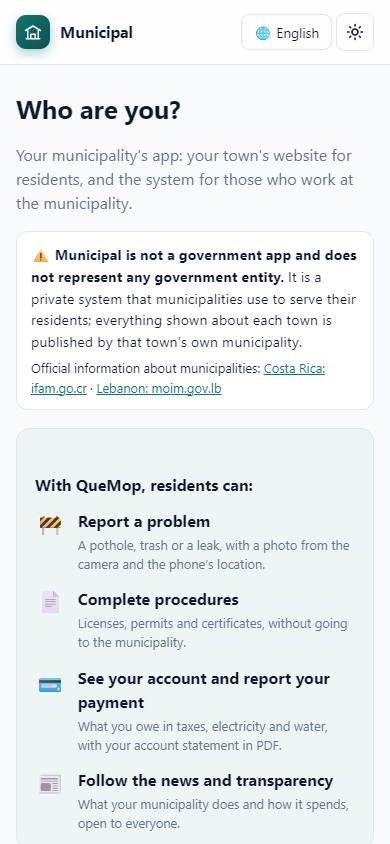
The QueMop 2.0 app: the phone's own screens

The app no longer shows the website in a window: since version 2.0 (iPhone) and 3.0 (Android) it has its own screens, which open instantly and keep working without signal. It has five tabs. Home shows the town's home page in its colors, six shortcuts, the generators notice, the pharmacy on duty and the news. Report sends a problem with photos from the camera and the GPS, and follows it in My reports. Guide brings together emergencies and services: one tap calls or opens Maps, even without signal. My account shows what the resident owes in each currency, their receipts, their consumption in bars and the account statement to share, with the session in the phone's keychain and protected with Face ID or fingerprint. More gathers news, procedures with their requirements, contact, language and changing town. Staff and collectors still sign in to their panel and to «My route» from the same app. The town's home page in the app

The app says it is not a government app and links to the official sources

The welcome screen of the QueMop app now says, at the top, that the app is not a government app and does not represent any government entity: it is a private system used by municipalities, and what is shown about each town is published by that town's own municipality. Below are the links to the official sources about the municipalities of each country, with the country name in the viewer's language. Google Play asks this of apps that show government information. The sources are changed in Platform settings, without touching the server. The app's welcome screen with the notice

The QueMop app uses the phone: Face ID, camera, sharing and reminders

With version 1.1 of the iPhone app and 2.1 for Android, the app adds what only the phone can give. Staff and collectors can lock it with Face ID or fingerprint when they come back to it. In reports, the camera makes photos smaller so they upload with little signal, and the GPS marks the place accurately. PDF certificates, account statements and request certificates are shared with the phone's share sheet. Collectors share the image of the receipt even without signal, and the phone reminds them of unsent collections. Residents set a reminder in My account for the day before each due date.

The account deletion page names each app as it appears in the store

At quemop.com/borrar-cuenta, the title and the first paragraph now name each app exactly as it is called on Google Play and the App Store, along with the developer shown on the listing. Google requires this to accept the data safety link. The names are changed in Platform settings → Apps in the stores, without touching the server, whenever a listing changes its name.

One page to delete the account of any QueMop app

At quemop.com/borrar-cuenta, in all 6 languages, is how to delete the account of each QueMop app: in QueMop Municipal, with Delete my account in My account; in the others, or if you can no longer sign in, by asking by email. It says what is deleted, what the law requires to keep (without the name) and how long it takes. It is the link Google Play asks for in each app's data safety section.

The detailed electricity bill, like a real generator's

The electricity bill now includes all the detail the authorities require: the subscriber and their account number, the amperage, the previous and current readings, the consumption, the price per kWh, the amount, the fixed charge and the total, also in another currency if desired. Each municipality chooses the title, the name of the fixed charge (for example, "maintenance") and the footer with the maintenance phone number. Print the bills prints the whole month's bills, one per page, in the order of the collector's route. The cash desk receipt and the collector's slip show the same figures. The electricity bill In the month's rate, the fixed charge is now entered as a table by amperage (5 A, 10 A, 15 A and more), and the new month starts with the previous month's rate.

The system's value, in the panel and on the home page

In Settings → System value, the mayor sees what the system is worth today in dollars, what each stage added and what similar systems charge. If the municipality receives it as a donation, it says so at the top. The value grows on its own with each new stage. Development of the system began on January 1, 2026. The system's value The same figure appears on the public home page, under System value, with the hours of work, the lines of code, the files, the modules and the languages. The system value on the home page
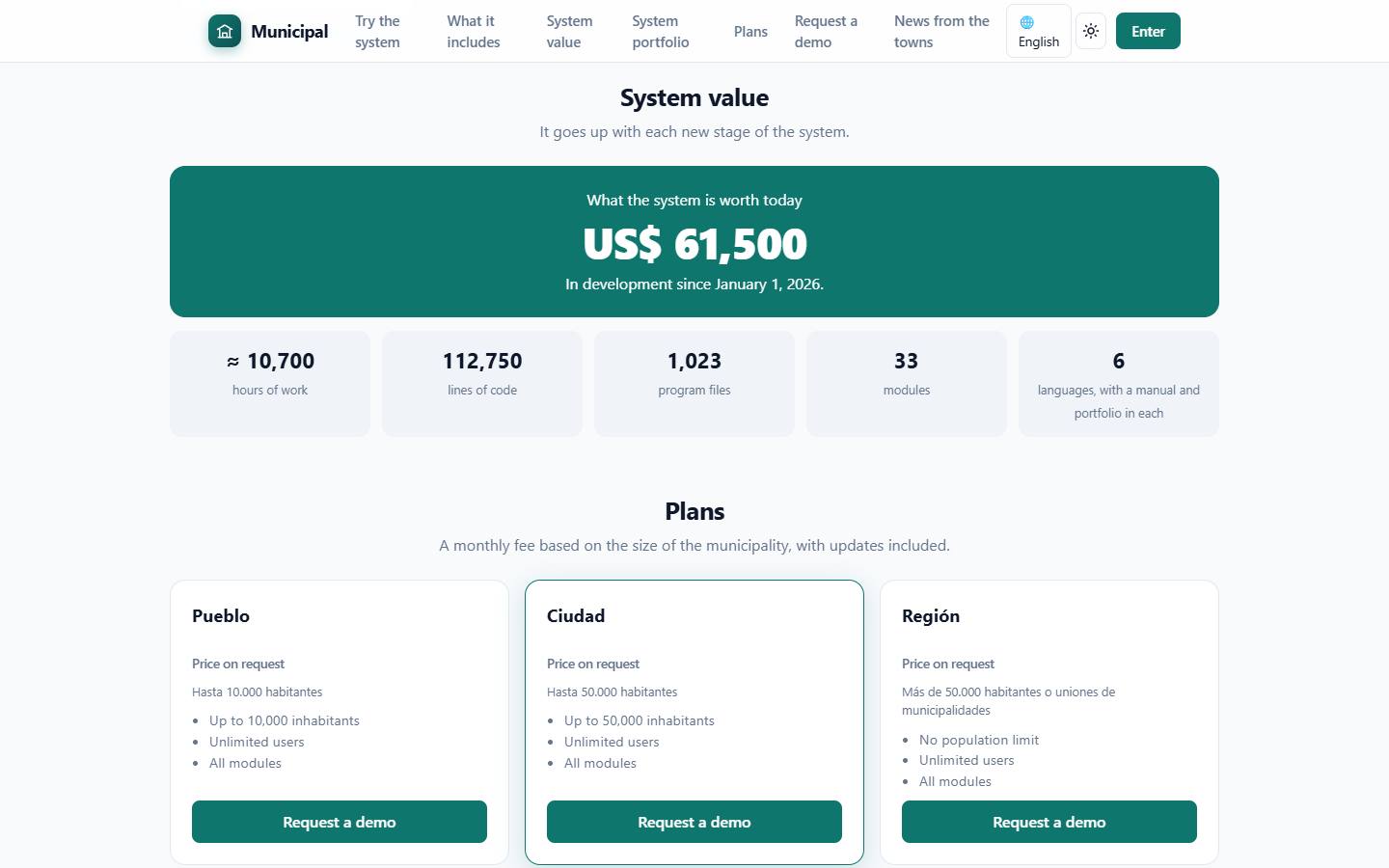
The platform name, from the panel

The name shown at the top of the website, in the QueMop app and in its privacy policy is changed in Platform → Platform settings, without touching the server.

Residents delete their account from the app, and the app has its privacy policy

In My account, Delete my account deletes the name, ID and contact details of the resident's account, with their password; their record and receipts stay with the municipality. And the QueMop app has its privacy policy and terms on quemop.com, the ones Google Play and the App Store require.

A single app, QueMop, for residents, collectors and staff

Like ride-hailing apps: the same app serves everyone and, depending on who signs in, knows where to take them. The first time it asks Who are you?: residents choose their town just once and the app opens its website directly, neighborhood collectors go to My route, and the rest of the staff sign in to their panel. The town can be changed from the bottom of the website. It is coming to Google Play and the App Store under the name QueMop. The app's welcome screen

Numbered paper receipt books for collectors

Until everyone has a phone, the collector keeps using paper receipts, but numbered ones: the treasury hands out receipt books, the cash desk enters each receipt with its number and the date it was collected, and the system shows which numbers are missing. A number cannot be entered twice, and a torn sheet is voided with its reason. Paper receipt books

The collector's handover to the treasury

The neighborhood collector hands in what they collected on the street: Collector cash handover shows how much each one has to hand in according to their receipts, and the treasurer receives it by counting the cash in front of them; the shift is closed and the cash stays in the treasury, with any difference recorded. Each municipality chooses when the handover takes place (at the end of the round from the 1st to the 5th, every day or when the treasury asks), and the Collections by collector report counts visits, collections and payment promises. Collectors' handover

My route: receipt by WhatsApp or Bluetooth, "not at home" and payment promises

The collector leaves the resident the receipt by WhatsApp, even with no signal, or printed on a pocket thermal printer via Bluetooth, with Arabic printed correctly. If nobody is in or the resident asks for a few days, they note "Not at home" or the date by which the resident promises to pay, and the house is marked on the route. Each municipality sets how many days ahead a promise can go, whether part of the debt can be collected, and the receipt footer. The receipt, ready to send or print

My route: the collector reads the meter and collects at the house, with no signal

The neighborhood collector no longer needs the receipt book: with My route on the phone they go around their houses in order, type in the generator meter reading, see the month's electricity on the spot and collect everything in the same visit, in the local currency or in dollars, with change and a receipt. It works with no signal: when the internet is back each visit is sent automatically, the reading is billed and the official receipt is issued, never charging twice. A house in My route

See all updates (95)

Neighborhood collectors: each neighborhood with its collector and its route

For the municipality that collects door to door: each neighborhood has its collector, and Collection routes shows the houses in the order they are visited, with what each one owes. Electricity and water drop the hand-typed "sector" and use the same neighborhoods as the census, also in the disconnection list, the readings and the reports. And in the electricity rate, the percentage surcharge now raises only the kWh, as the surcharge for an altitude category is applied: the fixed charge by amperes no longer goes up. Collection routes

Decisions from the register, daily activity log fingerprint and tailored erasure

The sale or donation of an asset and the contract of a purchase that goes through oversight no longer carry a hand-typed decision: it is chosen from the council's register, among those in force. A purchase on invoice looks at its own oversight rule. Every night the activity log's fingerprint is emailed to whoever the municipality chooses, and with it you can check that nobody changed the log. When anonymizing a resident, the municipality chooses what else is erased (certificates, licenses, census, the activity log, which is left struck out without breaking the chain) and which official books it keeps. Everything can be changed from the panel. The activity log

Tighter controls on procurement, correspondence, assets and the activity log

Purchases can no longer be rushed through with dates: none goes into the future or before the previous step, a recorded bid cannot be changed, nothing is awarded before bid closing or above what the procedure allows, and the procurement rules are changed by whoever configures the municipality. Correspondence keeps its official dates in order, Answer marks the incoming letter as answered, and confidential case files do not appear to those who cannot see them. Donating an asset also requires the council decision. The activity log detects a line whose fingerprint was erased, and a municipality's changes stay only in its own activity log. Voting data stays restricted after every update, and anonymizing a resident also erases their WhatsApp notices.

Tamper-proof activity log, amounts by currency and privacy

The activity log automatically records the before and after of charges, receipts, exchange rates, taxes and rules, and each line is chained to the previous one: Verify the activity log tells whether someone touched it in the database. A currency without cents no longer shows them on documents, and receipts, minutes and certificates always come out in the municipality's language. Voting data is restricted, anonymization reaches procedures, notices and the census, and backups can go to a bucket nobody can delete, with a drill that tests the restore. The activity log

Municipal police

Municipal police reports in the system: each with its number, the officer, the facts and the measure. The fine for operating without a license is calculated with what the law sets and collected at the cash desk; what the judge fines goes to the court and the decision is recorded. Municipal police reports

Stored certificates and property certificate

Every certificate is stored with its number, is reprinted identical and can be revoked; scanning the QR code shows whether it is valid, has expired or was revoked. New: the property certificate, with its registry details and whether anything is owed. The QR code no longer depends on the application key. Certificates

Public procurement

Purchases are no longer a supplier typed by hand into the expense: each one follows the procedure its amount requires (by invoice, quotations, tender or direct contracting on legal grounds), with the invited suppliers, the bids, the award to the cheapest or with grounds, the standstill period, the contract with its guarantee and the council decision, and acceptance by a committee of three. The amounts and time limits of the procurement law are configurable. Public procurement

Asset inventory

Everything the municipality owns in one place: land, buildings, vehicles, generators, equipment and furniture, with their code, location, person in charge, value and condition, and the history of every move and change until the write-off; selling an asset requires the council decision. The fleet's vehicles come in with one click and the inventory at a date comes out as an official book for stamping. Asset inventory

Incoming and outgoing correspondence

The secretariat's book of incoming and outgoing mail in the system: each letter with its number and official date, the stamp for the paper, the scanned letter, the link to the case file and the answer, which marks the incoming letter as answered. Those past their deadline without an answer are shown in red, and the year's register is printed as an official book for stamping. Correspondence

Closing account and official books for stamping

The year-end closing account (what was collected, what was paid, the balance carried over and what was left uncollected per resident) and the books the law requires to be numbered and stamped: the budget book, the registers of reserved appropriations and of payment orders, and the cash book. In PDF they come with an opening sheet for the oversight authority's stamp and signature. The ready-made reports, grouped by topic

Expenditure in four stages and the Municipal Fund

Expenditure follows the stages the law sets: a commitment that reserves the appropriation, settlement against the invoice, a payment order signed by the head of the municipality, and payment. What is ordered by December 31 can be paid through January 31, charged to the previous year. The installments of the municipal fund are recorded with their year and what the State withheld, and donations and donor-funded projects now have their entries. Commitments and payment orders

Objections against charges

A new screen for a resident's objection against a charge: it gets a number and a file, the system counts the deadline to object (and flags the one that came in late), the municipality's deadline to decide and the objections committee's, and what is granted is discounted from the charge. The owner can request a revaluation of their property, and the value set by the valuation committee is kept with its minutes. It follows the deadlines the law sets. Objections against charges

Business licenses per room, per machine and with an opening license

Business licenses charge the way municipal fee laws require: the opening license is paid only once when the business is registered, the yearly amount can be per unit (room, machine, pump, horsepower), each activity stores the law's minimum and maximum and the amount cannot go outside them, and the first year can be charged by the month. The legal template loads the law's categories: hotels, restaurants, cafés, bars, fuel and classified establishments. Activities and rates

The legal template

A button in "My municipality" loads in one go what the law already sets: the fees on rental value and on sidewalks and sewers, with their minimums, the building fee and deadlines, the council oversight rules, the years for the limitation period, the building certificates and the public space occupation classes. It only applies what is missing, without overwriting what the municipality has already configured. My municipality

Deadlines, occupancy and fine of the building law

The building permit follows the deadlines of the law: the list shows the deadline the municipality has to decide (for example, 2 months, 6 with consultations) and marks overdue ones, where the resident may deem the permit granted; the license lasts 6 years with one 2-year renewal; completion is the final, partial or provisional occupancy permit; and unfinished facades pay, after a grace year, 15% of the fee per year. Works and building permits

The building fee per m², as the law sets it

The building permit no longer has to charge a percentage of what the resident says the works are worth: where the law requires it, it charges per m² built on the value per m² of land set by the valuation committee, with its brackets, mezzanines at a quarter, the surcharges for public property, social projects and the engineers' fund, and the building of sidewalks and sewers. Walls and repairs pay a flat amount, exempt properties do not pay, and the works record shows the fee line by line. Works and building permits

Use of public space and advertising

A new module for tables on the sidewalk, kiosks, awnings and signs: each municipality sets up its permit classes with the license and the amount per year (per m², higher if illuminated, or a percentage of the space value), grants the permits and issues the year without charging twice, prorated by month. Occupation and advertising permits

Revaluation of rental values by law

One button multiplies the rental values of the whole registry according to the law: the law's factors are loaded (for example, ×10 for housing; ×10, ×20 or ×15 for everything else depending on the floor) and you can see how much each group changes before applying. It respects values already revalued, and every property keeps the history of its value: the previous one, the new one, the reason and who changed it.

Statutory exemptions and time-barred debts

Properties exempted by law (places of worship, diplomatic missions, the UN, State buildings) are marked once, with the reason, until when and from which taxes, and are no longer charged when issuing. Debts become time-barred after the years the municipality sets (for example, four): the system counts from the issue date or from the last payment, plan or payment demand, and shows those already time-barred so they can be declared with their grounds, with their accounting entry.

The council to the letter of the law

Only the mayor can change the council rules, with the before and after recorded in the activity log, and a session that has already been called keeps its own. Quorum is checked before every vote, members' reservations go into the minutes, and oversight applies when the amount exceeds the limit, as the law says. The law's rules are loaded with a single button. Annulling a decision requires its legal basis; the year's register is printed for the oversight authority's endorsement, with the fingerprint of the last entry; the authority's written approval is attached, and the chair's decisions are communicated to the authority.

Portfolio, manual with screenshots and AI assistant

The system portfolio is at the top of the menu and on a public page to send by WhatsApp or email, in six languages and in PDF, with the screens of each module. The manual has been completely rewritten, with screenshots and frequently asked questions, and the new assistant answers in plain words how to do anything, with the button to the screen. The portfolio in the panel

Accounting that balances to the cent

The receivables account is now exactly what residents owe: the surcharge is counted on the day it is added, voided charges and credit balances have their own entry, and exchange differences go to their own account. Expenses have to fit in the available appropriation of their budget line, and expenses and entries are voided with a reversal instead of being deleted.

A safer cash desk: voiding undoes everything

Voiding a receipt now undoes everything it did: it restores the debt, voids the other charges, leaves the credit balance as it was and reopens the payment plan. Whoever collected does not void their own receipts, and a shift that has already been closed does not change. Exchange rates that have already been used to collect cannot be changed or deleted, and every change is recorded in the activity log. The data the cash desk stores to collect without internet is encrypted with a 6-digit cash desk PIN and erased when the user logs out.

A renewed "To disconnect" list, for electricity and water

The disconnection list shows at the top how many subscribers there are, how much they owe and how many sectors to visit; you choose how overdue (from 15 to 180 days) and the table comes grouped by sector, with what each resident owes including today's fine. From each row you can disconnect, call or write by WhatsApp, and several can be disconnected at once. The disconnection list, grouped by sector

Water by annual subscription according to gauge

For towns where water is not read: each house pays for the year according to its gauge, in one, two, four or twelve installments, with a late fee and a connection fee. One button issues the year's installments for all subscribers, without charging twice.

Electricity: generators running and a notice on the website

The municipality enters its generators and records when they start and when they are switched off: the system counts the hours of each one and, while they are running, the website's home page shows what time they started. The electricity module refers only to the municipality's own power supply. The municipality's generators with their running hours

Electricity: subscribers without a meter and late-payment fine

Flat-fee subscribers pay the charge for their amperes without needing a reading, and the electricity bill adds a late-payment fine configured by the municipality.

News from the towns

A page brings together the news from all municipalities with a public website, with their coat of arms and the link to their website, filtered by country and region, with a directory of towns and RSS subscription. Each municipality can choose not to appear.

Each municipality at its own address

Each municipality's website opens on its own subdomain, and staff log in to the panel through that same address.

Municipal council

Sessions with notice of meeting and agenda, quorum, roll-call or secret ballot, tie-breaks and recusals for personal interest; minutes in PDF; and a numbered, unalterable decisions register, with submission to the oversight authority and tracking of deadlines. Council sessions

More security for residents' data

Links sent to residents can all be revoked, including old ones; photos from reports are kept private and without the phone's location; backups are sent encrypted to the destinations the platform chooses; and residents can request their data or ask for it to be erased.

A clearer panel

The left-hand menu shows each group with its colored icon and highlights the screen you are on.

Cash desk: treasury and end-of-day closing

The treasury receives each closing and each withdrawal by counting what is handed over, records bank deposits with their slip and produces the day's closing for all cash desks, with alerts for cash desks not closed and cash not deposited. Treasury: closings received, deposits and alerts

Cash desk: withdrawals, partial cash count and resending from the profile

From the resident's profile, any receipt or the account statement can be resent by WhatsApp or email. The cashier withdraws cash with a reason, adds change, counts the cash desk without closing it and, on closing, prints the shift report with signatures.

Receipts with QR code and certificate of good standing

Every receipt carries a QR code that confirms whether it is authentic and whether it was voided. It is printed on a full page, half page or ticket, with a marked copy and automatic printing on payment, and the certificate of good standing with a QR code is issued from the profile. Receipt history

Formal payment notice and bulk sending

The resident's account statement, grouped by tax with late fees and totals by currency, arrives by email with the PDF attached and by WhatsApp with the link. It can be sent to one or to many, filtering by neighborhood, tax, amount or days overdue, and the municipality writes its own text and legal basis. Residents: payment notices are sent from here

The municipality's subscription

Each municipality sees its plan, its invoices and its payments, with a notice before the due date; a new municipality starts with the base configuration and its trial days.

Cash desk: discounts, credit balance and payment in advance

Discounts and exemptions with permission and a reason, overpayments kept as a credit balance, payment in advance for the coming periods, reference number for transfers and search by code.

Cash desk: the resident's profile when collecting

When the resident is chosen, the cash desk shows their details, their debt by currency and alerts (payment plan in arrears, reported payments, services disconnected, missing phone number), with tabs for payments, payment plans, procedures and services; with no resident selected, the day's summary. The cash desk with the resident's profile

The website installs as an app

Each town's website installs on the phone with its name and color, like an app. The website on the phone

Voice agent

An assistant that answers the municipality's phone: it tells residents how much they owe, where their case file is or how their procedure is going, takes reports and messages, answers questions and transfers the call to the right office. Voice agent settings

Electronic case files

A number per year, folios that cannot be changed or deleted with integrity checks, transfers between offices with acknowledgment of receipt, confidential files and online lookup for residents. Case files

Consultations and participatory budgeting

The municipality asks residents from the website, with a single option, several or participatory budgeting; the vote is secret and whoever the municipality chooses can vote, including expatriates. Consultations with residents

Markets and fairs

Stalls with tenant and contract, monthly rent issued automatically and prorated, daily fair permits and an occupancy and debt report. Market stalls

Staff payroll

Salaries with configurable deductions, contributions and income tax brackets, proration by days, approval, Christmas bonus and payslips, with the expense charged to the budget line. Payroll

Fleet and machinery

Vehicles and machines by kilometers or hours, with fuel, maintenance, trips and incidents, warnings for maintenance, insurance and vehicle inspection, and the cost of each one. Fleet and machinery

Building permits

The works go together with the procedure: fee on the value of the works, license with an expiry date, inspections with photos, closure orders and completion. Works and building permits

Cadastre with map

Each property on the map, colored by account status, use or declaration, with its boundaries drawn and its cadastral data. Cadastral map

Budget and accounting

Entries are generated automatically from what is billed and collected, with an editable chart of accounts, a budget by line with its amendments, expenses, period closing and reports: budget execution, trial balance, general ledger and financial statements. Journal

Property tax and mobile wallet payments

Value declarations from the panel or from "My account", sole home exemption, and payments by mobile wallet that are recognized from the bank alert forwarded from the municipality's cell phone. Value declarations

Donor projects and unions of municipalities

Projects with a budget by line, disbursements, expenses converted at the day's exchange rate, indicators, progress updates with photos and a donor report in the donor's language; and a union's overview with each member's totals. Donor projects

Receipts by WhatsApp and email

On payment and from the history, the receipt is sent to the resident's WhatsApp or email, with a link to view and print it without an account.

Debts in the municipality's language

The description of each charge is written in the municipality's language, whatever the language of the person who generates it.

Terms, privacy and tracking on the website

The footer of every page links to the terms of use and privacy policy, written by the municipality, and to "Track my procedure" and "Track my report".

Offline cash desk

Without internet, the cash desk keeps collecting with a provisional receipt; when the connection returns, each payment gets its official receipt and is never collected twice. Payments taken offline

Cash desk counter

Quick resident search, payments in several currencies and methods with change, other charges and shifts that open with a float and close by counting the cash. Cash desk shifts

Resident accounts

Each resident creates their account on the website, links it to their profile with the code on their receipts and then logs in with their password to see their debt and their receipts and to report payments. My account on the website

Website: a clearer menu and each website with its own language

The website menu becomes a bar with "More" and, on the phone, a "Menu" button. The language a visitor chooses applies only to that website.

Login with the town's photo

The login screen shows the town's photo, the coat of arms with the name and the language under the globe; the browser tab carries the municipality's icon.

Try the system with one click

On the home page you choose a sample town and a role, and log in without a password; the demo is reset every night and never sends a real message.

Cemetery

Sections in a grid with niches and plots, burials, exhumations, rentals and renewals, a color-coded map, register of the deceased and a search for families on the website. Cemetery map

Business licenses

Activities with a fixed rate or one based on declared income, installments, PDF license with a verifiable QR code, renewal and expiry notices. Business licenses

Metered water

Rates by blocks or flat fee, readings from the phone with possible-leak warnings, monthly billing and a disconnection list. Water readings

Online procedures and permits

A catalog of procedures with requirements and cost, requests from the website with attachments, steps by role, tracking with a code and a certificate with a verification QR code. Procedures on the website

The website's inner pages

Each page of the website has its header, and "Municipality" shows opening hours, address, phone, population, neighborhoods, introduction and history. The municipality's page

More readable Arabic

The website and the panel use a clearer Arabic typeface, and the arrows point in the right direction.

Payment plans

Installment agreements on overdue debts, with a down payment, a printed plan, frozen late fees and monitoring of arrears. Payment plans

"My account": debt and reported payments

Residents see their debt with the day's late fee and report a payment with proof; the cash desk confirms or rejects it with a reason. Payments reported by residents

A livelier website: events calendar and gallery

A new home page with large quick-access buttons, "Today in town" and the year's figures; an events calendar with events to add to the calendar and a photo gallery by album. Events calendar

Resident reports

Residents report a problem with a photo and a location on the map and follow it with a code; staff handle it in an inbox with statuses, people in charge and a map. Reports map

Import from Excel, export and reports

Residents, properties, past debts and more are imported from Excel with the columns guessed; any list can be exported to Excel or PDF, and there are ready-made reports for the cash desk, taxes, registry and more. Importing data

Website: coat of arms, photos and social media

The municipality's coat of arms, a banner of rotating photos, social media and the address with Google Maps and Waze buttons.

Notices to residents by email and WhatsApp

Each municipality connects its email and its WhatsApp (with a QR code or Meta's official one) and chooses which notice goes through each channel: charges issued, reminders, receipts, donations and messages. Notices sent

Census of neighborhoods, houses and people

Neighborhoods with their representative, houses and land plots, and people with their place of residence, including expatriates, ready to be invited. People in the census

Resident guide and donations

A guide with emergencies, duty pharmacy, hospitals and schools; donation campaigns with a target, donations in any currency, receipts and published expenses. Resident guide

The town's website and six languages

A public website with home page, authorities, news, transparency and open data, and the whole system in six languages. The website's home page

Authorities, electricity, chat and the mayor's dashboard

Authorities with photo and history, municipal electricity with readings and billing, internal chat with notices to a role and chat with residents, and the mayor's full dashboard. Messages

Roles, two-factor authentication and activity log

Each municipality's own roles, two-factor authentication and a security code for sensitive changes, and an activity log of who did what. Activity log

User manual

The system's manual, inside the panel, in all six languages. User manual

Registry, taxes, cash desk and transparency

The core of the system: registry of residents and properties, configurable taxes, a cash desk in any currency with receipts and voiding, and a transparency portal with totals only. Taxes and fees

✨ Ask the system

Have a question about what it does? Ask in your own words and the assistant will answer with what the system really includes.

Want to see it in action?

Enter a demo with sample data, without signing up, or ask us for a presentation for your municipality.